03 / AI REPO RADAR
xerj-org/xerj
12,458 starsLicense: Apache-2.0Last push: On the radar:
Local-first search engine and MCP server in one Rust binary: indexes code, docs and logs so agents query the exact passage instead of reading files one by one.
What XERJ is and the problem it targets
XERJ is a local-first search engine and MCP server built for AI agents. According to its README, everything ships as a single Rust binary that can index source code, documents, logs, JSONL and CSV files and PDFs, and then serve BM25 full-text search, vector search and hybrid search. In front sits an Elasticsearch-compatible API, so familiar clients and tooling can be pointed at it unchanged. The repository belongs to the xerj-org organization, uses the Apache-2.0 license and had 12,458 stars on GitHub when it was collected.
The problem the README targets is specific: coding agents tend to read files one at a time and burn a large number of tokens just to find the passage they need. XERJ wants to replace file reading with querying an index, so the agent only receives the relevant passage. The README calls its main use case reference coding: give an agent a task, and it downloads the open-source repositories closest to the problem, indexes them, and reuses how those projects solved it before writing its own code.
Beyond reference coding, the README lists other uses: codebase question answering, security audits, log and incident analysis, long-term agent memory and replacing Elasticsearch. This article walks through each part as the README describes it. Where the README says nothing, the article says so plainly instead of guessing.
Why grep is not enough for agents
The README makes an argument about context. An agent that greps only learns where to look, because a grep hit is a single line and judging that line still means opening the whole file. By the author's own measurements, one corpus pushed up to 1.06M input tokens into the agent. An agent that queries XERJ instead receives the specific passage, and the README says each question costs on the order of kilobytes.
The example it gives is WordPress core: the PHP is about 5.2 million tokens, or 26 full context windows, so an agent cannot simply read it all. In an AI security audit of WordPress core described by the author, the agent worked across 1,492 PHP files on roughly 26,000 tokens, which is about what it takes to load half a percent of the tree. These are numbers the author reports about their own tool; the README points to a separate write-up rather than explaining the measurement on the main page.
Notably, the README states its own conditions. The value is greatest on private code, internal code, niche code, or code newer than the model's knowledge cutoff. On popular public libraries the model already knows, the effect is neutral or even harmful. In other words, XERJ is presented not as a silver bullet but as a way to make up for what the model does not know.
How it works: autoindex on a folder
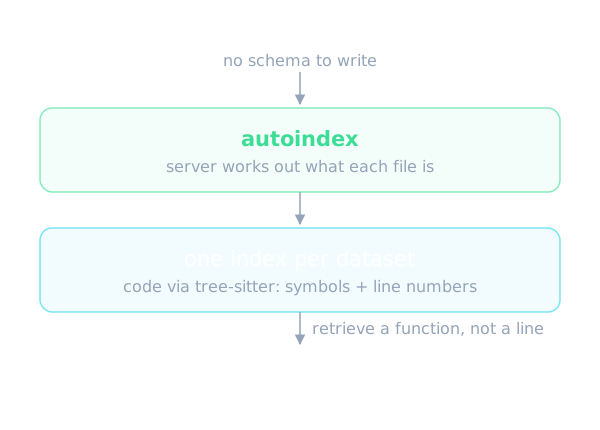
The central command is autoindex. You start the server and point autoindex at any folder. The README says there is no schema to write and no pipeline to configure: XERJ works out what each file is and creates one index per dataset it finds. Source files go through tree-sitter, so indexed code arrives with its symbols and line numbers rather than as flat text. That lets an agent retrieve a function instead of a line.
The README lists a long set of supported formats: CSV, JSON, JSONL, XML, YAML, SQLite, PDF, DOCX, PowerPoint with one record per slide, Excel with one dataset per sheet, EPUB books with one record per chapter, Jupyter notebooks with one record per heading section, man pages, HTML, mail including eml files and mbox mailboxes, and common log formats. Unity projects get special handling: text-serialized scenes, prefabs and assets become one record per GameObject or Component, and meta files become a GUID-to-path table.
On code indexing, the README says re-indexing is incremental: a file whose content is byte-identical to the last indexed generation skips parsing and carries its committed result forward. The author writes that typically over 95% of files are unchanged in the edit-and-rerun or CI case. The full content hash still runs to detect changes, though, so total re-index time is floored by hashing rather than by parsing.
Measurements the author reports
The part the README stresses most is a controlled study of reference coding. As described, it covered 8 tasks across 4 languages, 16 runs per arm, using real token counts from claude -p, on code the model had not memorised. Three arms were compared: the model working from memory only, an agent driven by grep, and an agent using XERJ.
The README table reads as follows. Memory only cost 260,916 output tokens and 11.18 dollars and solved 11 of 16. The grep-driven agent used 26,477 tokens, 3.27 dollars and solved 16 of 16. XERJ used 9,982 tokens, 1.58 dollars and also solved 16 of 16. From these the author derives 2.7x fewer output tokens than grep and 26x fewer than memory alone at the same solve rate, 2.1x cheaper, and up to 278x fewer on a single Java task.
The README also describes a companion run scoring 9 of 9 with retrieval versus 0 of 9 from memory on a Rust library the model had never seen. In addition, it cites user field reports saying people see roughly 5x fewer tokens in everyday work. All of these figures are the author's own claims. The README points to the case study and the field reports so readers can check them, and this article has not re-verified any of them.
Connecting an agent over MCP
Not every agent can run a shell command. Desktop assistants and function-calling hosts reach tools through the Model Context Protocol, and the README says the binary you just installed is itself the MCP server, with nothing else to download or compile. The xerj mcp command speaks MCP over stdio and proxies to the node named by the XERJ_URL variable. It does not start a node, so you must run one first. The MCP server adds no trust of its own; the node's boundary is the one that counts.
Seventeen tools are exposed. Eleven are thin proxies over endpoints XERJ already serves: search using the Elasticsearch-style query DSL, semantic search over a semantic_text field, kNN over a dense_vector field, hybrid search with RRF or linear fusion, storing and recalling agent memory in a namespace, four tools for the second-brain link index, and xerj_plan, which turns a plain-words filter into validated query DSL. The README stresses that xerj_plan is deterministic and rule-based, not an LLM.
Two tools are not plain proxies: xerj_map returns the per-index field map from the autoindex catalog, and xerj_code_search runs the reference-coding pipeline and returns its rendered text. The remaining four are xerj_field_report, which files a field report, and three hub tools that answer from Corpus Hub packs already on the machine.
The README also says the tool schemas are generated from a live tools/list call rather than written by hand, and are gated in CI plus a unit test so the published list cannot drift from the served one. One practical note: use an absolute path in the MCP configuration, because hosts launched from a desktop icon do not inherit your shell PATH. If the node runs with auth, add the XERJ_AUTH variable to the configuration.
Agent memory, hybrid search and scoring with Jev
For long-term memory, the README describes a namespaced memory route: the agent stores what it learns as it works and recalls it by meaning in the next session. One sample prompt in the README asks the agent to use the memory notes API as its long-term memory for the project. The README also mentions a knowledge graph over your own documents. Details such as data durability or memory size limits are not covered in the main README.
On semantic search, the README warns that the default embedder is lexical feature-hashing, not neural, unless the node runs in neural embed mode. Neural mode needs three model files staged locally before the first semantic operation. That is worth knowing before expecting real semantic quality from the default configuration.
The README has a section on Jev, a TypeSafe AI service that returns a number from 0 to 1 for how well a document answers a question. There are two ways to use it. First, add rerank to a search so XERJ sends the top results to Jev and reorders them. On the public FiQA test, nDCG@10 goes from 0.24 to 0.36 for about 0.64 dollars across 648 searches. The README warns plainly that this sends result text to TypeSafe servers, stays off until you set a key, and can be forbidden entirely by configuration.
Second, the compatible endpoints accept the same kind of questions but XERJ answers them locally by looking up the most similar documents you have already labelled, for example messages marked spam or not spam. Nothing leaves the machine and no key is needed, but it only works if you have labelled examples. On AG News with 120k labelled examples, the README says it picks the right label 92% of the time. The answer is given under XERJ's own name, not Jev's.
Installing and trying it
The README describes two ways in. The fast one is a single-prompt install in which the agent reads the llms.txt file for the ordered steps: install, start the server, run autoindex on the current folder, query with any Elasticsearch client, then the reference-coding loop of cloning similar open-source projects, indexing them, retrieving the mechanism before writing, citing what you use and respecting licenses.
The manual route is one static binary with no JVM and no dependencies, prebuilt for Linux, macOS and Windows on x86-64 and arm64, or built from source with a stable Rust toolchain. The first commands after install are to start a node with the insecure flag and a data directory, wait until it responds, and then run autoindex on a project folder. The README does not state specific hardware requirements.
Two operational details get emphasis. First, keep the data directory outside any folder you autoindex, because the data folder is not in the built-in ignore list and the node would index its own storage. Second, if the server has auth on, which is the default for every start without the insecure flag, autoindex needs the same API key through a flag or an environment variable, otherwise every request comes back 401. For hosts without internet access, the README points to an air-gapped deployment recipe, and the default lexical embedder runs offline.
Elasticsearch compatibility and benchmarks
XERJ implements the Elasticsearch REST API: indices, documents, bulk, search, aggregations, mappings, kNN, scroll, reindex and the cat endpoints. Kibana and the official client libraries connect directly. The README is explicit that this is API compatibility, not a reimplementation of Elasticsearch internals and not a fork. The conformance suite runs on every commit and currently passes 1366 of 1369 cases, with the remaining gaps listed openly.
One boundary to know before pointing export tooling at it: scroll is a bounded up-front snapshot, so a query whose exact total exceeds the snapshot window is refused with a 400 rather than silently truncated. For large result sets the README recommends search_after.
On performance, the author benchmarks XERJ head to head against Elasticsearch 8.13.4 across ingest, full-text search, aggregations, vector search and reads issued under a concurrent write flood. The latest closed-loop run scores 55 wins, 26 ties and 4 losses, including 1.72x ingest throughput and a 1.61x smaller on-disk footprint. All four losses are the same gap, read p99 while a high-rate writer runs, and the author says they wrote it up in full. These are self-reported results; the README invites you to rerun them and advises skepticism toward any number you cannot reproduce, including theirs.
On code indexing, on an Apache Lucene checkout of 6,113 source files and 51 MB, single-threaded in-process extraction runs at about 1,500 files per second, or 13 MB per second, with the tree-sitter parse taking about 72% of that. The author treats this as the per-file floor.
Limits and safety
The most important safety point the README makes itself: the insecure flag turns off TLS and API-key auth, so every caller that can reach the port is a superuser who can read and delete every index, including every memory namespace. It is meant for one user on a dev machine. A fresh node binds 127.0.0.1 only, and a cleartext bind on any other interface refuses to start unless you explicitly allow it.
The README admits several other limits. The measured value depends on whether the model has memorised the code. Reranking with Jev is the only search-time feature that sends document text off the node, needs an operator-configured provider key, and its ranking quality with the real model is not verified. The default embedder is not neural. The project also has a community mechanism: the README asks users to send back one short field report as a commit or PR, and welcomes both humans and agents.
On licensing, the README says Apache 2.0. It does not cover memory requirements, maximum index size or upgrade guidance between versions, so if you need those you will have to read the project's own documentation.
When to use it and when not to
Going by what the README describes, XERJ fits when your agent must work over a large body of knowledge that is impractical to read straight into context: internal code, niche repositories, code newer than the model's cutoff, mixed log piles or bulk document sets. It also fits if you want one local binary that speaks both the Elasticsearch protocol and MCP, instead of standing up a separate search cluster and vector database.
Conversely, if your agent mostly works with famous public libraries the model already knows, the README concedes the benefit is neutral or harmful. If you do not want to run a local server with security rules you must manage yourself, or you need neural semantic quality from the default configuration, think carefully. And because the performance figures are the author's own, try it on your data before relying on them.
In short, XERJ is worth a trial for agent builders hitting a context bottleneck, as long as you read the trust boundary of insecure mode carefully and treat the numbers in the README as claims to be reproduced.
Written automatically by AI from the repo's README and GitHub API data, with automated checks but no human review of every sentence. Report mistakes by email.