03 / AI REPO RADAR
thedotmack/claude-mem
107,971 starsLicense: Apache-2.0Last push: On the radar:
Persistent memory for coding agents: it records what happens in a session, compresses it with AI and injects relevant context into later sessions, with MCP tools for searching it back.
What claude-mem is and the problem it targets
claude-mem is an open source persistent memory system for coding agents. The README describes it as a memory compression system built for Claude Code: it captures what an agent does during a session, compresses it with AI, and injects relevant context back into later sessions. The repository description names several other hosts as well, such as OpenClaw, Codex, Gemini, Hermes, Copilot and OpenCode. At the time of this snapshot the repository has 107,971 stars and uses the Apache-2.0 license.
The problem it targets is familiar to anyone who works with agents for long: when a session ends or reconnects, the agent forgets. Design decisions, bug fixes and the reasons behind them disappear, and the user has to explain everything again. According to the README, claude-mem preserves context across sessions by capturing tool usage observations, generating semantic summaries, and making them available to future sessions, so that Claude keeps continuity of knowledge about a project.
This article relies only on the README and the repository metadata. Where the README is silent, for example on the exact storage format of summaries or on measured recall quality, the article says the README does not cover it instead of guessing. The README also contains promotional parts, such as a hosted trial and a community token; they are treated here as context, not as technical claims.
How it works: hooks, a worker and a database
The README lists six core components. The first is the lifecycle hooks: SessionStart, UserPromptSubmit, PreToolUse, PostToolUse, Stop and SessionEnd. Each one is a single shell-free command run by a small launcher that the installer puts on the PATH. Because it hooks into the session lifecycle, the tool can record what the agent does without the user doing anything by hand.
The remaining components are a cached dependency checker called Smart Install, a worker service that exposes a local HTTP API with a web viewer and search endpoints and is managed by Bun, a SQLite database that stores sessions, observations and summaries, the mem-search skill for natural language queries, and a Chroma vector database for hybrid semantic and keyword search. The architecture documents the README points to mention the SQLite schema with FTS5 search and a hybrid search design with Chroma.
The overall data flow, as the README frames it, is this: hooks collect observations, the worker and database store them, an AI compression step produces summaries, and when a new session starts the relevant context is injected back. The README does not spell out the algorithm that decides which context is injected; that lives in the architecture documents it links to, so this article does not speculate further.
The three layer search workflow and the token budget
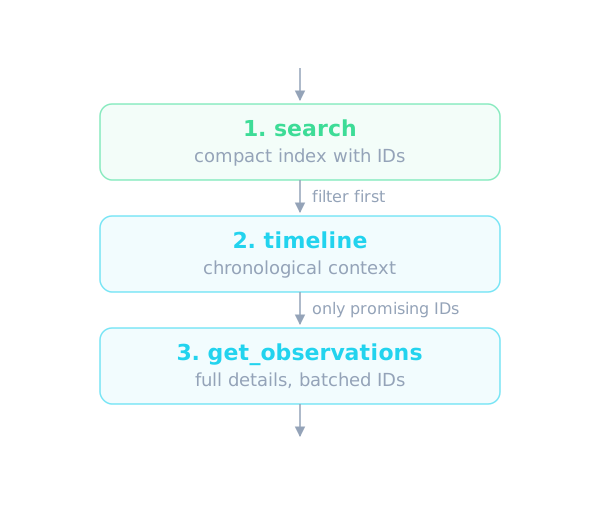
The most notable design choice is retrieval. claude-mem exposes memory search through MCP tools that follow a token-efficient three layer workflow. Step one is search, which returns a compact index with IDs at roughly 50-100 tokens per result. Step two is timeline, which gives chronological context around an observation or a query. Step three is get_observations, which fetches full details only for IDs that were already filtered, at roughly 500-1,000 tokens per result.
The idea is to filter before fetching. The agent uses search to see what might be relevant, uses timeline to understand the surrounding context, and calls get_observations only for the few IDs that matter, so the full history never has to be loaded into the context window. The README says this approach saves about 10x in tokens. That figure is the author's own claim, and the README gives no measurement method, so it cannot be verified from the source.
The README advises batching several IDs into a single get_observations call. Its tool description names three main tools: search with filters by type, date and project, timeline, and get_observations, while its heading says there are 4 MCP tools. The README does not say what the fourth tool is, a small inconsistency worth knowing about before you integrate.
Installing and trying it
The README gives several install paths, one per environment. The general path is a single installer command run through npx, and a second path is installing from the plugin marketplace inside Claude Code. There are also separate instructions for OpenCode version 1.3.4 or later, for T3 Code, for the Antigravity CLI, for OMP, for the native Pi extension and the DeepSeek Harness plugin, and for OpenClaw gateways. After installing, the README asks you to restart the tool, and context from earlier sessions then appears in new sessions automatically.
One important note in the README: claude-mem is also published on npm, but a global npm install gives you only the SDK or library. It does not register the plugin hooks and does not set up the worker service. So you should install with the npx install command or the plugin commands it names, not with a plain npm package install.
On system requirements, the README lists Node.js 20.0.0 or higher, a recent Claude Code with plugin support, Bun as the runtime and process manager that is installed automatically if missing, uv for vector search which is also installed automatically if missing, and SQLite 3 which is bundled. For Windows there are specific notes: the hooks do not need Git Bash, and the installer places the launcher in a user folder and adds it to the Path, so you should restart your terminal or IDE afterwards.
Main features according to the README
The README gives a feature list. Persistent memory keeps context alive across sessions. Progressive disclosure provides layered retrieval and shows the token cost of each layer. Smart search is the default and uses the three step mem-search skill to query project history. There is also a skill for Claude Desktop so you can search memory from conversations there, and a citation system that lets you reference past observations by ID through the worker API or view them in the web viewer.
The README also describes a local My Work view that shows live requests, progress, human handoffs and a saved review queue at the worker address printed on startup, while memory, sessions and settings stay on the viewer page. TeamBrain is an optional shared workspace for teams, with work lists, member attribution and linked findings; the README says each person chooses what to share, and personal requests and review notes stay separate.
Other features include fine grained control over what context gets injected, automatic operation without manual steps, and an optional screenshots feature that is off by default. When it is on, converted copies of images are kept in the user's data folder, uploaded to a cloud service only when cloud sync is on, and sent to the observer model only when image inference is enabled separately.
Using it in an AI agent workflow
For people who build agents, the practical value is turning the work log into a reusable asset. A bug fixing session today leaves observations about the cause and the fix; in a later session, when a similar failure appears, the agent can look it up instead of exploring from scratch. By the README's description, relevant context is injected automatically when a session starts, so the daily workflow barely changes.
When deeper digging is needed, the three layer workflow fits an agent that has to respect a context budget: search a compact index first, look at the timeline around promising results, and load details for only a few IDs. This keeps the agent from stuffing the whole history into the prompt, which tends to raise cost and dilute the model's attention.
The README also shows the tool is not meant for a single agent only. It supports many environments and has an option to include observations from every harness in the Claude Code and Codex session start context, by enabling the include all sources at session start setting in the settings file or the viewer; the default is false, meaning startup context is limited to the current harness. The observation count limit still applies across the selected sources. For teams that run several different agents, this is a way to share one memory store.
Configuration, privacy and language modes
Settings live in a settings.json file in the claude-mem data folder under the user's home directory, created with defaults on first run. The file controls the AI model, the worker port, the data directory, the log level and the context injection settings. On privacy, the README says you can use tags to exclude sensitive content from storage, but it does not go into the tag syntax in its main text; the details are in separate documentation.
The tool supports several workflow modes and languages through the CLAUDE_MEM_MODE setting. This setting controls both the workflow behavior, for example code, chill or investigation, and the language of the generated observations. The code mode is the default English mode, code--zh is Simplified Chinese, code--ja is Japanese, and other languages follow the pattern code--lang using the ISO 639-1 language code. The Simplified Chinese mode is already built in and needs no extra install. After changing the mode you need to restart Claude Code.
On the choice of model provider for the compression step, the README says that after signing in you can pick the claude-mem observer, your own OpenRouter or Gemini key, or your Anthropic plan. People who do not want to sign in can pass an explicit provider flag, set CLAUDE_MEM_ONLINE_OPTIN to false, or run in a non-interactive CI shell so that the installer finishes without any account step.
Limits and things to watch
The first thing to weigh is that this memory uses AI for compression, which means the content of your sessions passes through a model to produce summaries. The README default is a hosted memory service with a 30 Day Free Trial after you sign in by email; when the trial ends, memory falls back to your Anthropic plan unless you subscribe. A local observer mode is opt-in and must be enabled deliberately. If your project data is sensitive, read this part carefully before signing in.
Second, the README claims about 10x token savings and up to 100% more usage from your plan; both are the author's own claims, and the README includes no benchmark or measurement method. It also gives no numbers on recall accuracy, latency or disk growth over time, so you will need to measure those in your own project.
Third, the README is a long page and is not fully tidy: the Quick Start section mixes install instructions for many environments, some commands do not show in the text we read, and there is a small mismatch between the number of MCP tools in the heading and the tool list. The README also mentions CMEM, a token made by a third party and embraced by the author; that is a community matter unrelated to the technical function of the tool, and you do not need it to use claude-mem.
When to use it and when not to
claude-mem is worth trying if you work on the same codebase over many agent sessions, if you keep re-explaining old decisions, or if you use several harnesses and want one shared memory store. The three layer search model also suits you if you care about the token budget and want to control how much context is loaded.
Think twice, or hold off, if your project has sensitive data that you do not want passing through an outside model, if you want a small tool without a background worker and database, or if you need quantitative evidence of recall quality before committing. Since the README offers no independent benchmark, the safe path is to try it on a small project, open the web viewer to see what gets stored, and only then expand its use.
In short, claude-mem is a memory solution with a clear architecture of hooks, a worker, SQLite and Chroma, plus a deliberately token-saving three layer retrieval. The Apache-2.0 license allows embedding it into your own tools. Treat the performance claims as the author's until you verify them yourself, and base the choice between hosted and local mode on how sensitive your data is.
Written automatically by AI from the repo's README and GitHub API data, with automated checks but no human review of every sentence. Report mistakes by email.