03 / AI REPO RADAR
stablyai/orca
111,184 starsLicense: MITLast push: On the radar:
Open source app for running several coding agents side by side, each in its own git worktree and tracked in one place, with desktop and mobile companions.
What Orca is and the problem it addresses
Orca is an open source application from the stablyai team, described as the place for working with a whole fleet of agents. The README introduces it as the AI orchestrator for 100x builders and says you can run Codex, ClaudeCode, OpenCode or Pi side by side, each in its own worktree, all tracked in one place. The 100x figure is the author's own marketing line, and the README attaches no measurement to it.
The problem it targets will be familiar to anyone who has used several coding agents. Running one agent means one terminal window. Running five means five windows, five git branches and five places to check which agent has finished and which is waiting for you. Orca pulls these chores into a single interface so you do not have to act as secretary for your own pack of agents.
According to the GitHub metadata, the repository has 111184 stars, an MIT license and its latest push on 2026-10-31. It was created in March 2026, so it is a very young project that has already drawn heavy interest. The short repo description stresses that you run agents with your own subscription, and that the app is available on desktop, mobile and a remote runtime.
How Orca organizes work: worktrees and terminals
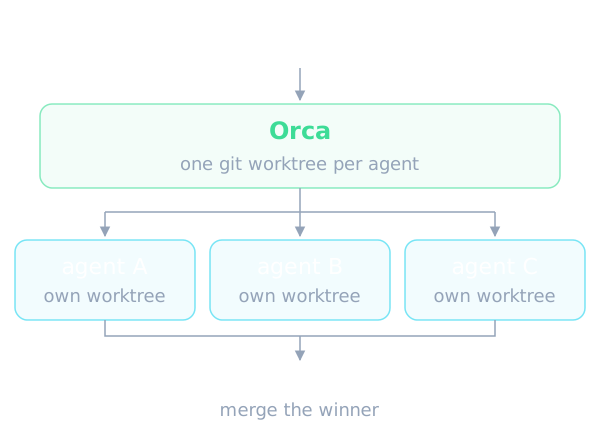
The central idea in the README is that each agent runs in a separate git worktree. The Parallel Worktrees section describes fanning one prompt across five agents, each in its own isolated worktree, then comparing the results and merging the winner. This avoids several agents overwriting the same working directory, because every agent gets an isolated copy of the source.
On the terminal side, the README says Orca offers Ghostty-class terminals with WebGL rendering, infinite splits and scrollback that survives restarts. For people who leave agents running for a long time, keeping terminal history across app restarts is a worthwhile detail. The README does not explain how scrollback is stored or whether its size is capped.
There is also a feature called SSH Worktrees. According to the README, you can run agents on a beefier remote machine while keeping full file editing, git and terminals, with auto-reconnect and port forwarding included. That is a sensible direction when a laptop cannot carry several heavy agents at once.
Headline features according to the README
The README lists a long run of features. Mobile Companion lets you monitor and steer agents from a phone, get notified when an agent finishes and send follow-ups from anywhere. The README mentions an iOS app on the App Store and an Android APK, with a separate install guide.
Design Mode lets you click any UI element in a real Chromium window and send its HTML, CSS and a cropped screenshot straight into the agent's prompt. For front-end work this shortens the effort of describing in words which component needs changing. Annotate AI Diffs lets you leave comments on any diff line and ship them back to the agent, so review, editing and committing can happen without leaving Orca.
The app also integrates GitHub and Linear: browse pull requests, issues and project boards in the app, open a worktree from any task and review without switching context. Dragging files or images into an agent prompt is described alongside a VS Code style editor with autosave everywhere.
The Also in the box list adds more: quick open across worktrees, files, agents, commands and repo context; an account switcher with usage tracking for Claude and Codex and their rate-limit resets; previews for Markdown, images and PDFs; Computer Use so agents can operate desktop apps; and unread state for threads. The README admits the list is perpetually behind because the team ships daily, and treats the changelog as the real feature list.
Orca CLI: letting agents drive Orca
An interesting point is that the README says agents can drive Orca too. The Orca CLI lets you script every workflow with commands such as creating a worktree, taking a snapshot, clicking and filling. In other words, Orca is not only a control panel for humans but also an automation surface that an orchestrating agent can call.
This opens up a model in which a lead agent splits a task, creates child worktrees and watches the results through the CLI. The README only names example commands and points to the documentation. It does not describe permission boundaries or safeguards for an agent calling the CLI, so if you plan to let an agent control Orca, read that documentation first.
Installing and trying it
According to the README, Orca ships as a desktop app for macOS, Windows and Linux. You can download it from the project site, grab a build directly for macOS Apple Silicon, macOS Intel, Windows or a Linux AppImage, or install through a package manager. The README excerpt available to us does not spell out the exact package manager commands.
The mobile app is a companion: it pairs with the desktop app to monitor and steer your agents. The repository also contains the relay that pairs the mobile app with a desktop host, located under the cloud folder with its own pnpm workspace and setup guide. Anyone who wants to contribute or run it locally is pointed to the CONTRIBUTING file.
Windows builds are code signed through SignPath.io, with the certificate provided by SignPath Foundation, as the Signed Builds section of the README states. It is a small detail, but it shows the team cares about trustworthy distribution.
Which agents are supported
The README claims Orca works with any CLI agent: if it runs in a terminal, it runs in Orca. The list names many agents, such as Claude Code, Codex, Grok, Cursor, GitHub Copilot, Muse, DeepSeek Harness, ZCode, OpenCode, MiMo Code, Amp, OpenClaude, Antigravity, Pi, oh-my-pi, Hermes Agent, Devin, Goose, Auggie, Cline, Continue, Kimi, Kiro, Qwen Code, Rovo Dev, and finally a catch-all entry for any CLI agent.
This approach helps because you are not locked into one vendor. You can put two different agents on the same task in two worktrees and compare them. The README also stresses running with your own subscription, meaning Orca does not sit in the middle charging for tokens. However, the README does not say whether deeper integrations, such as finish notifications or usage tracking, apply to every agent in the list.
Using Orca in an AI agent workflow
A realistic workflow could look like this. You open a task from GitHub or Linear, create a worktree from it, hand it to three different agents, then review each agent's diff, leave notes on the lines that need work and send them back. When one result is good, you merge it and discard the other worktrees. The README describes all of these steps as possible inside one app.
For long-running tasks, notifications and the mobile app mean you do not have to sit in front of the screen. When an agent needs confirmation, you get notified and answer from your phone. Combined with SSH Worktrees, a remote machine can do the heavy lifting while you only supervise.
If you are building a multi-agent system of your own, Orca is not a library to embed in code. It is an application for developers as end users, and the Orca CLI is the only door the README mentions for scripting it.
A practical way to evaluate it
Because the README makes broad claims and ships quickly, a short trial is the most reliable evaluation. Pick a small, well-understood task, give it to two different agents in two worktrees, and watch how Orca presents their progress, notifications and diffs. Note how much of your usual terminal and branch juggling disappears, and how much remains.
Then try one longer task and step away from the desk, using the mobile companion to check on it. If the notifications arrive when they should and follow-ups reach the agent, the product is doing its job for you. If you find yourself returning to the desktop for routine steps, that tells you where the tool does not yet fit your habits. None of this is covered by numbers in the README, so your own observation is the only evidence available.
Limits and things to watch
First, the README leans heavily on promotional language, such as the orchestrator for 100x builders. Those performance and productivity claims are the author's own, and the README provides no verifiable benchmark or comparison. Try it on your own workflow before believing it.
Second, the README says the team ships daily and the feature list is always behind reality. That means features change quickly and documentation may lag. The README also has a Privacy section saying Orca collects anonymous usage data and pointing to documentation on how to opt out. The part we have does not detail what is collected, so read that documentation if you handle sensitive code.
Third, the Computer Use feature lets agents operate desktop apps and visible UI. That is a powerful capability that calls for thought about permissions and scope, yet the README does not discuss a safety model for it. Finally, the README does not cover hardware requirements, resource use when running many agents, or how conflicts are handled when merging several worktrees.
When to use it and when not to
Orca fits if you already run several command line coding agents and are tired of managing terminals, branches and notifications by hand. It also suits people who want to compare the output of several agents on the same request, or who want to watch agents from a phone and run them on a remote machine.
It is a weaker fit if you use a single agent for small jobs, because the main benefit lies in parallel orchestration. It is also not the choice if you need a framework for building agents in code, or a stable API guarantee, since the README promises neither. With 111184 stars and an MIT license, trying Orca costs nothing but time, and the best way to judge it is to run two or three real tasks and compare them with your current workflow.
Written automatically by AI from the repo's README and GitHub API data, with automated checks but no human review of every sentence. Report mistakes by email.