03 / AI REPO RADAR
HKUDS/DeepTutor
50,344 starsLicense: Apache-2.0Last push: On the radar:
An agent-native learning workspace: chat, problem solving, quizzes, research and visualization share one runtime, with several RAG engines and layered memory.
What DeepTutor is and the problem it targets
DeepTutor is an open source project from the HKUDS group, which the authors describe in a single line: lifelong personalized tutoring. The README presents it as an agent-native learning workspace that connects tutoring, problem solving, quiz generation, research, visualization and mastery practice in one extensible system. Put simply, it is less a single chatbot and more a workspace where many learning activities share the same runtime layer underneath.
According to the metadata collected for this edition, the repository uses the Apache-2.0 license, has 50344 stars, and gained 8157 stars over the previous seven days. Those numbers only show community interest and say nothing about the pedagogical quality of the product. The topics attached to the repository include ai-agents, multi-agent-systems, rag, deepresearch, cli-tool and interactive-learning, which places the project at the intersection of agents, knowledge retrieval and interactive learning.
Why agent builders should care
Although it is aimed at learners, the way DeepTutor organizes its system is an example of an application built around agent capabilities rather than around one prompt. The README does not position itself as a general purpose agent framework, so the more accurate reading is as a reference design: it shows how a real product handled familiar problems such as session management, knowledge retrieval, memory, tools and permissions.
Most of the README is a very long release history. The latest release is announced as v1.7.0, with items such as modular installation, a refreshed learning workspace, block notebooks with Dito, narrated video lessons, resumable embedding checkpoints and more reliable tutoring. The long list of earlier releases shows how quickly the project moves. The README also says contributions of any kind are welcome and points to a roadmap page where people can vote on items or propose new ones.
This article relies only on the README as collected, and that README is cut off in the middle of the installation guidance. Anything the README does not say, such as internal architecture details or tutoring quality, is marked as not covered rather than guessed.
One runtime shared by every mode
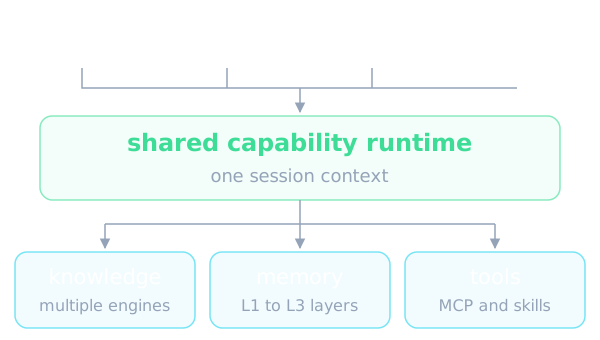
The key features section states that Chat, Ask Questions, Quiz, Research, Visualize, Solve, Mastery Path, Immersive Reading and Audio Overview share one capability runtime and session context while keeping purpose-built loops and pipelines. The notable point is that the foundation is shared without forcing every mode into the same mold. For an agent builder this answers a familiar question: how do you offer many agent behaviors without repeating session handling in each one.
The release history gives a few clues about how this runtime evolved. Version v1.4.0 is described as the GA cut with Auto Mode, three-layer Memory, agentic Deep Research, Solve and Question modes, a LlamaIndex RAG refactor, and a restart-safe turn runtime. Earlier, v1.4.3 moved Chat to a single agent loop, and v1.0.0-beta.1 announced an agent-native architecture rewrite with a Tools plus Capabilities plugin model, along with a CLI and SDK. The README goes no deeper into how the loop works, so internal details are not documented there.
Beyond the main modes, the README mentions a Task Board for tracking study tasks in To do, In progress and Done, with notes, drag-and-drop or keyboard-accessible move buttons, and an archive you can restore from. Cards stay in the current workspace and need no model configuration. The immersive video feature lets you add YouTube or Bilibili links to Reading for native playback, transcript search, timestamp-grounded tutoring, saved notes and resumable progress; YouTube captions and browsing can use an Invidious instance configured by an administrator.
Multi-engine knowledge: not tied to one retrieval backend
The README lists multi-engine knowledge: versioned RAG libraries across LlamaIndex, PageIndex, GraphRAG, LightRAG, a remote LightRAG Server, a self-hosted WeKnora knowledge base, a Tencent IMA or MarginNote 4 library, a connected Kiwix ZIM archive, or a linked Obsidian vault, with pluggable document parsing. For an agent builder this means the retrieval layer is not bound to a single backend, and knowledge can come from personal notes as well as dedicated document stores.
The release notes add detail, and these are the authors' own descriptions. Version v1.5.2 says PageIndex can reason across your documents through agentic tool calls. Version v1.5.15 adds a self-hosted PageIndex OSS with reasoning retrieval and Apache Tika parsing. Version v1.4.12 introduces the LightRAG Server engine, a lightweight PyMuPDF4LLM parsing engine, and a FAISS vector backend that the authors say makes large knowledge-base retrieval dramatically faster. Version v1.6.10 brings native LightRAG role models and a published index that records and enforces what built it.
The operational details are also worth reading. Version v1.3.0 has versioned knowledge base indexes with a re-index workflow; v1.5.1 lets you remove a single failed document instead of deleting and rebuilding the whole base; v1.7.0 has resumable embedding checkpoints; v1.0.3 has embedding mismatch detection. Taken together, the list reflects the familiar pains of RAG in practice: re-indexing, embeddings that no longer match the model, documents that fail halfway. The README offers no independent comparison data for these engines.
Layered memory and connected learning context
The README describes inspectable memory: L1 traces, L2 surface summaries and L3 synthesis, intended to make personalization visible and editable. The Memory Graph links L2 facts to L1 evidence and L3 synthesis to the surfaces that contributed to it. The design is notable because each summary layer points back to its source evidence, which gives users something to check and correct.
The connected learning context section says knowledge bases, books, Learning notebook pages, Favorites, question banks, personas and Memory can be reused across the workflows that support them, subject to account grants and learning policies. In the release history, v1.6.15 mentions bounded tutoring memory, and v1.4.8 says each Partner has its own private memory.
The README does not describe the storage format of memory, how the L3 synthesis is computed, or how the accuracy of personalization is measured. There is therefore no basis in the source for judging the quality of this memory layer; all that can be said is that a three-tier design with evidence links is a pattern worth studying.
Subagents, Partners, tools and skills
The Subagents and Partners entry says that from Chat you can consult a live agent harness, namely Claude Code, Codex, Grok CLI, Antigravity, Kimi, opencode, MiMo, Hermes, OpenClaw or DeepSeek, or a Partner; you can import past conversations and run persistent IM companions on the same brain. Version v1.4.7 is more specific: connect your local Claude Code or Codex and consult it live in the middle of a turn.
On Partners, v1.4.3 records that TutorBot became Partners on a production-grade IM pipeline with 15 channels and live streaming. Version v1.4.8 lets you connect your own Partners under My Agents and consult them in chat, answering through their own persona, library and skills. Version v1.6.3 adds learner and guardian accounts.
On tools, the README lists built-in tools, MCP servers, CLI apps, image, video and voice generation models, and installable community skills from EduHub. Version v1.5.7 adds a per-account MCP Services store and 101 CLI Apps the tutor can run, and moves credentials out of the sandbox's reach. Version v1.4.10 makes MCP tools deny-by-default for non-admin users, and v1.4.4 installs community skills from ClawHub behind a security gate. For agent builders this is the most instructive group of features: per-account tool scope, deny-by-default and credential isolation.
Installing and trying it
The README offers an unusual starting point: copy a prompt into a terminal-capable AI agent such as Codex or Claude Code and let the agent set up DeepTutor. The developer and agent handbook is the documentation entry for setup, architecture, extension development, testing and troubleshooting, and its Agent Setup guide covers the full installation flow, including non-interactive CLI configuration.
If you install it yourself, the README says there are four installation paths, all sharing one runtime-home layout. Private settings live under the data/user/settings directory relative to where you launch, or under a path set with the DEEPTUTOR_HOME variable or the start home option. The recommended flow for the full app is to pick a runtime-home directory, install, run the init command, then start. The v1.7.0 notice says installing with pip and the full extra gives you the full Web app and CLI, while the bare package installs core only.
The release notes also mention Python 3.14 support, Compose deployments that keep all of the data directory, clean startup under rootless Podman, and the deeptutor doctor diagnostic in v1.5.17. The README as collected is cut off right after the recommended flow, so details of the other three paths, hardware requirements and model API costs are not covered in the source.
Using it in an AI agent workflow
As a reference design, the ideas that travel best to other projects are: one runtime shared by many modes, several retrieval engines behind one interface, layered memory with evidence links, consulting external coding agents from inside a conversation, and deny-by-default tool permissions. Each can be traced through the release notes to see why it appeared.
As a product, a team building a tutoring tool, onboarding flow or internal training could evaluate DeepTutor directly, using components such as Books, Courses and the Question Bank. For multi-user deployments, v1.3.8 describes optional multi-user deployments with isolated user workspaces, admin grants and auth routes, and v1.4.1 mentions per-user resource isolation.
On integration, the README mentions a CLI and SDK from the original rewrite and an HTTP and SSE API for TutorBots in v1.4.1. It provides no API documentation, so anyone who wants to embed DeepTutor in another system will need the project handbook.
Limits and when to use it or not
The project changes very quickly. The release history includes a breaking front-end and back-end refactor in v1.6.3, along with fix releases such as v1.6.6 and v1.6.7 that list quiet failures that were patched, for example quizzes that produced nothing or a copy button that lied. That shows active bug fixing, but also means users should expect a lot of change between versions. All descriptions in the release notes are the authors' own words, and the README includes no independent benchmark.
Scope is a limit as well: this is a whole learning workspace with a UI, many engines and many integrations, so it is much heavier than a minimal agent library. The README does not cover model call costs, hardware requirements, how tutoring quality is evaluated, or the data policy when content is sent to external model providers; these need to be checked before use with sensitive data.
Use it if you need an interactive learning platform to experiment with, or want to read an agent system that has been through many release cycles to learn how it handles retrieval, memory and tools. Skip it if you only need a few lightweight agent components, or if you need a long-term API stability commitment, which the README does not give.
Written automatically by AI from the repo's README and GitHub API data, with automated checks but no human review of every sentence. Report mistakes by email.