03 / AI REPO RADAR
headroomlabs-ai/headroom
77,575 starsLicense: Apache-2.0Last push: On the radar:
A local context-compression layer: shrinks tool outputs, logs, RAG chunks and files before they reach the LLM, usable as a library, a proxy or an MCP server.
What Headroom is
Headroom is an open-source tool that compresses everything an AI agent reads, including tool outputs, logs, RAG chunks, files and conversation history, before it reaches the language model. According to the README, the goal is to keep the model's answers the same while spending only a fraction of the tokens. The project uses the Apache-2.0 license and had 77575 stars on GitHub when collected. The repository topics include context-engineering, token-optimization, mcp, proxy and rag, so it is best seen as an infrastructure layer between the agent and the model provider.
The README stresses that compression happens on the user's own machine and that no prompt or file content is sent anywhere to be compressed. Its opening example is an input of 10,144 tokens compressed to 1,260 tokens while the agent still finds the same FATAL error. That is an illustration chosen by the authors, not an independent measurement.
The problem it targets
A coding agent reads a great deal in one session: code search results, system logs, JSON returned by MCP servers, file contents and a long conversation history. All of it enters the model's context window and is billed by the token. The README does not dwell on absolute costs, but its framing makes the core idea clear: much of what an agent reads is highly repetitive, so it can be shortened while keeping the lines that matter, such as errors and unusual values.
The repository's short description states figures the authors publish themselves: 20% fewer tokens for coding agents and 60-95% fewer tokens for JSON, with the same answers. The README also sets its own expectations: savings depend on how repetitive the payload is, and prose or output that is already dense compresses very little.
How it works inside
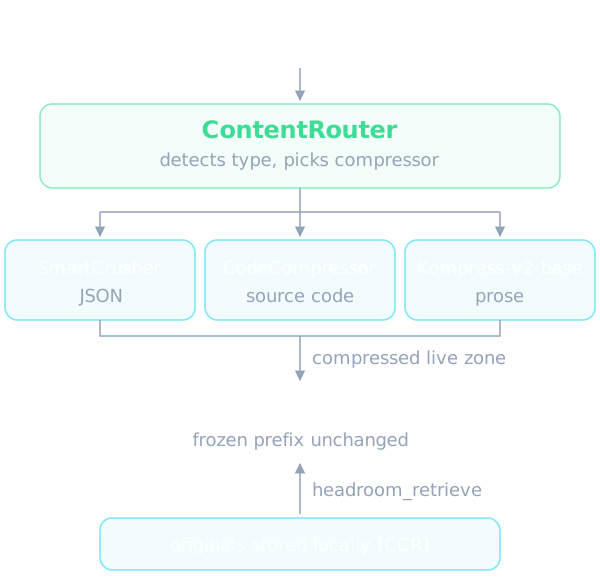
According to the README, the pipeline has several parts. ContentRouter detects the content type and picks a suitable compressor. SmartCrusher handles JSON, CodeCompressor handles source code, and Kompress-v2-base, a model the authors trained on agentic traces, handles prose. The README says SmartCrusher keeps error items, values outside the normal statistical range and first and last boundaries, selected from field-variance statistics rather than a keyword list. CodeCompressor is AST-aware for Python, JS/TS, Go, Rust, Java, C/C++, C# and PHP.
Two more ideas stand out: CacheAligner and CCR. CacheAligner flags volatile content that would bust a provider's KV-cache prefix, but the README states that it never rewrites prompts. CCR is the reversible-compression mechanism: originals are stored locally and the model can call the headroom_retrieve tool to get the full text when it needs it. Headroom also compresses only the live zone, meaning fresh tool output and the latest turn, while the frozen prefix stays byte-identical so the provider cache survives and history is never dropped.
Four ways to plug it in
The README lists several entry points. The first is a library: a compress function that takes a list of messages, available in Python and TypeScript. The second is a local proxy on port 8787 that needs no code changes and works with any language. The third is the wrap command, which wraps many agents such as Claude Code, Codex, Grok, Copilot, Cursor, Aider, OpenCode, Cline, Continue, Goose and OpenHands in a single command, with an unwrap command to undo it. The fourth is an MCP server with three tools, headroom_compress, headroom_retrieve and headroom_stats, for any MCP client.
The integration table also names hooks for the Anthropic and OpenAI SDKs, the Vercel AI SDK, LiteLLM, LangChain, Agno, Strands and ASGI middleware. For multi-agent systems there is a SharedContext that passes compressed context between agents. The README does not explain each integration in its main text and instead points to separate guides, so readers need those guides before adopting any of them.
Figures the authors publish themselves
The Proof section of the README builds four scenarios from real MCP server output formats, measured with the provider tokenizer and the shipped compress function. According to the authors, code search with 100 results drops from 17,199 to 13,597 tokens, a saving of 21%. SRE incident debugging drops from 55,957 to 24,340, saving 57%. Codebase exploration drops from 58,801 to 33,895, saving 42%. GitHub issue triage drops from 46,067 to 32,429, saving 30%. The authors say the runs are seeded and offline, so others can reproduce them.
On latency, the authors report compression costs well under a millisecond: 0.21 ms at p50 on a 10K-token JSON search result and 1.4 ms at 100K tokens. On accuracy, the tier-one evaluation suite gives GSM8K 0.870 on both sides, TruthfulQA moving from 0.530 to 0.560, SQuAD v2 at 97% with 19% compression and BFCL at 97% with 32% compression, each with N=100. The README itself notes that at N=100 a delta of plus or minus 0.03 falls inside the confidence interval, so TruthfulQA shows no detectable difference rather than an improvement. All of this is the authors' own data, and users should run the savings command on their own traffic.
The README also adds that savings scale with how repetitive the payload is: repeated JSON arrays and log lines clear 90% in the authors' latency benchmark script, while prose and already-dense output compress very little. For image inputs it claims a reduction of 40–90% through a trained ML router. In practice this means the headline percentages describe the best-fitting workloads, and a team should expect results somewhere between these extremes depending on how much of its agent traffic is structured tool output versus free text.
Reducing output tokens
The README argues that besides the tokens you send, you also pay for the tokens the model writes back, and on Opus-class models output costs 5× input. Much of that output is ceremony such as preambles, code re-printed back at you, and deep reasoning spent on routine steps like reading a file. Headroom tackles this at the proxy with two mechanisms and no code changes.
The first is verbosity steering: a short note asking for terse answers is appended to the end of the system prompt so the prompt cache still hits. The second is effort routing: it lowers thinking effort when a turn is only the model resuming after a tool result, such as a file read or a passing test, while new questions and errors keep full effort. Both apply to Anthropic's messages API and to OpenAI-compatible endpoints. Because nobody sees what the model would have written otherwise, the README says output savings are only an estimate with a confidence range, and it lets you hold out a share of conversations as an unshaped control to get a measured number.
Shared memory and learning from failed sessions
Beyond compression, the README mentions memory shared across agents: one store for Claude, Codex, Gemini and Grok, with agent provenance and automatic dedup. In the proxy's default cache mode, automatic injection of memory context on the Anthropic path is skipped so the prefix stays stable, and token mode is the choice when you want that injection.
The headroom learn command mines failed sessions and writes corrections to files such as CLAUDE.local.md, CLAUDE.md, AGENTS.md, GEMINI.md or GROK.md. The default is CLAUDE.local.md, which is gitignored. A verbosity variant infers the preferred terseness from behavior such as interrupting long replies. The README text we have is cut off right at the headroom learn section, so further detail on this command is something the source README does not cover; the project documentation would be the place to look.
Installation and compatibility
Headroom requires Python 3.10+ and has many optional extras such as proxy, mcp, ml, code, memory, vector, relevance, image, agno, langchain and evals. The README points out that the headroom command ships only in the PyPI package, while the npm headroom-ai package is the TypeScript SDK you import and provides no command. Prebuilt wheels currently cover macOS Apple Silicon and Linux, and on Intel macOS the README advises the Docker install. x86 hosts without AVX2 fall back to non-ONNX paths such as BM25 and heuristic detection instead of crashing.
The compatibility table lists many agents that support the wrap command. Cursor and ZCode need manual setup using the base URLs the proxy prints, and Cortex Code works only in library mode with savings of 60–65% according to the authors. The README also has dedicated guidance for corporate networks with SSL inspection, GitHub Copilot in VS Code and Claude Code in VS Code, and it admits that some flows, such as Linux Secret Service reuse, have not been validated on a real desktop.
Limits and when to use it
The README itself says when it fits: you run coding agents daily and want savings without touching your code, you work across several agents and want one shared memory, or you need compression that is reversible through CCR. It says to skip it if you only use one provider's native compaction and do not need cross-agent memory, or if you work in a sandbox where local processes cannot run. Short conversational exchanges, prose and already-dense payloads see little or no reduction, and blocks under the minimum word threshold come back byte-identical.
Treat the savings figures with care, since they are the authors' own measurements on four predefined scenarios. Because Headroom sits between the agent and the model provider, and wrapping changes agent configuration, it is sensible to try it first on a small project, check the savings command against real traffic and know how to undo it with unwrap before rolling it out more widely.
Written automatically by AI from the repo's README and GitHub API data, with automated checks but no human review of every sentence. Report mistakes by email.