03 / AI REPO RADAR
firecrawl/firecrawl
195,040 stars+2,589 / 7dLicense: AGPL-3.0Last push: On the radar:
Open-source API to search, scrape and interact with the web, returning markdown or structured JSON for agents; connects through a skill, CLI, MCP and several SDKs.
What Firecrawl is and the problem it addresses
Firecrawl presents itself as the API to search, scrape and interact with the web at scale, and calls itself the context API for AI agents. The README says the project is open source and also available as a hosted service. The short GitHub description says it gives your agents data from the web and beyond.
The problem it targets is familiar to anyone building agents: pages full of JavaScript, blocked requests, rate limits, and raw HTML that costs many tokens. Firecrawl takes an address or a query and returns clean content ready for a language model, such as markdown, structured JSON or screenshots. The README frames this as a way to spend fewer tokens and build better AI apps.
According to GitHub metadata, the repository has 195040 stars and the license is listed as AGPL-3.0. The most recent push was on the twenty-fifth of October, two thousand twenty-six. These figures only show community interest. The rest of this article relies entirely on the README written by the authors, and many of the performance claims in it are published by the authors themselves.
What the authors emphasize
The section on why to use Firecrawl lists eight points. On reliability, the authors say it covers 96% of the web, including JavaScript-heavy pages, with no proxy headaches. On speed, they publish a P95 latency of 3.4s across millions of pages, aimed at real-time agents. Both are figures the authors report about themselves; the README points to a benchmarks section, but the benchmark content is not part of this README.
On output, the project says it returns clean markdown, structured JSON, screenshots and more. On the hard parts, it says it handles rotating proxies, orchestration, rate limits and JavaScript-blocked content with zero configuration. On agents, a single command connects Firecrawl to any AI agent or MCP client.
The remaining points are document parsing, turning PDFs, DOCX and other documents into clean markdown or structured JSON; actions such as click, scroll, write, wait and press before extracting content; and being open source, developed transparently and collaboratively. Read these lines as the authors introducing their own work rather than as independently verified results.
The main endpoints
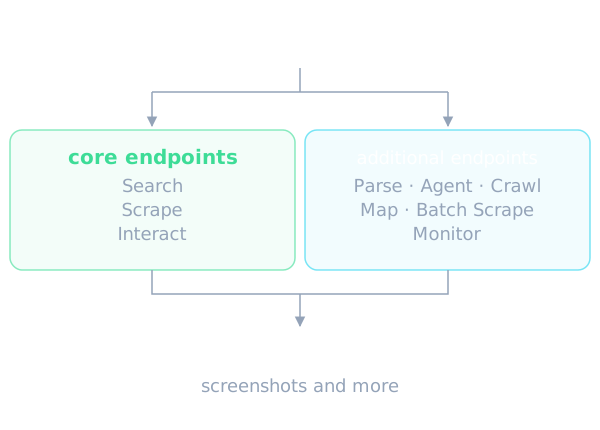
The README splits features into core endpoints and additional ones. The core group has three endpoints. Search searches the web and returns the full page content from results. Scrape converts any address into markdown, HTML, screenshots or structured JSON. Interact scrapes a page and then lets you interact with it using AI prompts or code.
The additional group has six more entries. Parse turns PDFs, DOCX and other documents into clean markdown or structured JSON. Agent is automated data gathering where you just describe what you need. Crawl scrapes all addresses of a website with a single request. Map discovers all addresses on a website instantly. Batch Scrape scrapes thousands of addresses asynchronously. Monitor notifies you when content on a website changes.
For each endpoint in the quick start, the README shows examples in Node.js, cURL and the command line, with the output. The example code is not present in the sanitized README, so this article does not describe exact syntax; see the original README or the API reference for parameters.
The Agent endpoint and effort levels
The README describes the Agent endpoint as the easiest way to get data from the web: you describe what you need, and Firecrawl AI agent searches, navigates and retrieves it, with no addresses required. The README says Agent is the evolution of the earlier extract endpoint, faster, more reliable, and no longer requiring you to know the addresses upfront.
There are two advanced variants. One is structured output, where you pass a schema to get data in that exact shape. The other is optional addresses, where you can focus the agent on specific pages instead of letting it search on its own.
The README also has a section on effort selection. Low suits simple lookups on one site. Medium suits multi-step tasks on a few pages. High suits deep research, complex navigation and critical data. According to the README, every effort level runs the spark-2 model; effort changes the reasoning budget, not the model. The names spark-1-pro and spark-1-mini are retired but still accepted for backwards compatibility, and they also run spark-2.
Crawl, Map and Batch Scrape
Crawl is for when you want the content of an entire website. The README says the call returns a job ID, after which you check the status of that job. There is a useful note: the SDKs handle polling automatically, which makes the developer experience cleaner than writing your own loop.
Map discovers the addresses of a website and has a search variant for finding specific addresses within a site. Batch Scrape scrapes many addresses at once. The three complement each other: Map to learn what a site contains, Crawl to fetch all of it, and Batch Scrape when you already have a list of addresses.
The README does not state limits on depth, page count or speed for these endpoints, and the descriptions say nothing about pricing per request type. If you plan to use them at volume, read the API documentation and the pricing page of the service.
Connecting to agents: skill, CLI and MCP
The Power Your Agent section is where the project speaks directly to agent builders. There are two main routes. The first is a skill: with one command you give your agent access to real-time web data, and you restart the agent after installing. The README says this works with Claude Code, Antigravity, OpenCode and more. The second is MCP: any MCP-compatible client can connect to the web in seconds, and the README points to a separate repository for the MCP server.
There is also a rather distinctive entry called Agent Onboarding, written for AI agents themselves: if you are an agent, fetch this skill to sign up your user, get an API key and start building with Firecrawl. In other words, the project treats agents as a first-class audience that needs its own instructions.
The integrations section mentions the Firecrawl skills catalog installable with one command, the Firecrawl command line tool, and the Firecrawl MCP. The README also explains how to contribute skills: skills that use the CLI go to the cli repository, build skills that integrate the SDK into product code go to this repository under the skills folder, and workflow skills go to the workflows repository. The catalog is read-only and does not accept pull requests directly. For platforms, the README lists Lovable, Zapier and n8n.
SDKs and supported languages
The README says the SDKs make it convenient to use all Firecrawl features and automatically handle polling for asynchronous operations. The language list is long: Python, Node.js, Go, Java, Elixir, Rust, Ruby, .NET and PHP. For each language the README has a short entry on installing the SDK or adding the dependency.
For agent builders this breadth is useful because teams often use several languages for backend services. The README does not say which SDK is more stable or which features exist in which SDK, though. The license also needs attention: the README says the SDKs and some UI components are under the MIT license, while most of the project is AGPL-3.0.
Open source and the cloud version
Firecrawl is open source under the GNU Affero General Public License, listed as AGPL-3.0, and the cloud version adds some extra features. That list of extra features is not in the sanitized README, so it cannot be named here. To run locally the README points to the contributing guide, and for self-hosting there is a separate self-hosting guide.
This matters when choosing how to deploy. Self-hosting gives you control, but the AGPL has its own obligations when you offer a service over a network, so read the terms carefully. The cloud version is more convenient but requires an API key and ties you to the provider. The README does not compare the two options in detail.
Limits, cautions and when to use it
The README includes a clear legal note: end users are solely responsible for respecting websites policies when scraping, and are advised to follow applicable privacy policies and terms of use. By default Firecrawl respects robots.txt directives. If your agent collects data automatically, this belongs in your review process.
What the README does not say includes usage-based cost, the free allowance, specific rate limits, how the 96% figure was measured, and how pages that require login are handled. All performance figures are published by the authors. Since this article rests on the README, verify the current endpoints and model names in the documentation before using them, especially because the README itself lists names that have been retired.
Firecrawl fits if your agent needs clean, structured web data, needs search plus full-text reading, or needs to turn PDFs and DOCX into markdown. It fits less well if you need a purely open source solution with no licensing conditions, or if your data sits behind a login that the README does not address. The practical approach is to install the skill or the MCP, try a few sample pages, and measure output quality on your own content before committing.
Written automatically by AI from the repo's README and GitHub API data, with automated checks but no human review of every sentence. Report mistakes by email.