03 / AI REPO RADAR
yetone/magpie
20,274 stars+5,278 / 7dLicense: MITLast push: On the radar:
A desktop app with a local gateway that sets the model for each coding agent (Claude Code, Codex, Gemini CLI...) from one place and fails over to another account when a quota runs out.
What magpie is and the problem it addresses
Magpie is an application that runs on your own machine and gathers model selection for several coding agents in one place. The project's tagline is that every agent's model lives in one place. The README's examples include Claude Code running on Kimi, Codex running on DeepSeek, Gemini CLI running on GLM, and OpenCode running on your ChatGPT plan. You switch from the menu bar, and behind it a local gateway serves all of the agents.
The problem the README describes is concrete. Each agent keeps its model in its own file, in its own format, with its own keys and base URLs. A subscription you already pay for works in one agent and nowhere else. Magpie puts all of that behind one app and one local gateway, so you no longer open each configuration file and edit it by hand.
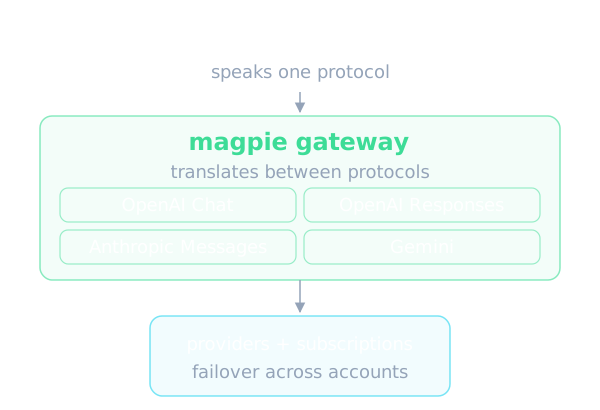
According to the README the project promises three things. First, pick any model for any agent from one shared list, with Magpie editing only the single key that matters in that agent's own config. Second, use one provider everywhere, whether that is an API key, a local model, or the Claude, ChatGPT, Copilot, Gemini or Grok plan you are signed in to. Third, keep going when a quota runs out: a routing group moves to the next account or model and the agent never sees the error.
How it works: a local gateway as the bridge
The center of the design is a gateway on the local address, port 3425. The README says it speaks four protocols, OpenAI Chat, OpenAI Responses, Anthropic Messages and Gemini, and translates between them, including streaming, tool calls and reasoning. That lets an agent that only knows one protocol use a model from a provider that speaks another.
When you pick a model for an agent, Magpie rewrites that agent's config atomically, meaning the write either completes or does not happen, and the README states that comments, order and formatting in the file stay as they were. That is a notable detail for people who hand-edit their config files, because the tool does not disturb what they wrote.
For applications outside the supported list, the README says anything that takes a base URL can use the gateway. The introduction does not spell out the setup for that case and points to the reference documentation instead, so you will need to read the project's docs when you get there.
Per-agent models, profiles and providers
On the Agents page you click a value and a searchable list opens. It shows every model of every provider you added, written as provider and model. The README also describes Profiles: you save every agent's setup under one name such as Budget or Focus and switch them all back in one move. Each agent can have its own short list of models, and a profile keeps that list too.
For providers, you pick a preset and paste a key. Model lists come from the vendor, while names and reasoning levels are filled in from the models.dev data source, so according to the README a model released this morning is in your picker on the next refresh. The presets named include Anthropic, OpenAI, Google Gemini, Google Vertex AI, Amazon Bedrock, DeepSeek, Kimi, Zhipu GLM, MiniMax, Qwen, Mistral, Groq, xAI, OpenRouter, Together, Fireworks, NVIDIA NIM, Ollama and LM Studio, among others, and any OpenAI- or Anthropic-compatible URL.
If you already have a setup elsewhere, Import can bring in providers from CC Switch, Claude Code, Codex and Alma. There are also Add to magpie links that let a provider's website hand its config to Magpie in one click. Each key and each account can go through a proxy of its own.
Subscriptions treated as providers
Another central idea is to treat a subscription as a provider. Per the README, an agent you are signed in to is a subscription with models behind it, and Magpie offers it as a provider to every other agent. You can add several accounts per subscription, and Magpie fails over between them.
The README's list includes Claude, where Magpie drives the real local claude binary and bridges the agent's tools over MCP; Codex and ChatGPT, so your ChatGPT plan's models work in every other agent; and GitHub Copilot, Gemini through Code Assist, Antigravity, Grok through SuperGrok and more. Any OpenCode auth plugin or pi package from npm is supported as well.
One small but practical feature is the Daily warm-up. It starts each Claude and ChatGPT account's 5-hour window at the times you choose, or the moment the last one resets. The README does not explain the reasoning further, so read it as a way to make the quota window begin counting exactly when you want it to.
Routing groups: spreading requests and failing over
A routing group is several models an agent picks as one, for example group/daily-coding. The gateway spreads requests over every member's keys and accounts. The README lists five modes. Smart uses, of the subscriptions with quota left, the one that renews soonest, so less is wasted at the reset. Order uses the first model until it cannot answer, then the next. Rotate moves to the next member on each turn. Usage uses the least-used member first. Pace uses the account with the most of its week left per hour until it resets.
The README stresses that a conversation stays with the account that answered it while the vendor's prompt cache is worth keeping. Groups can contain groups. This matters to coding-agent users, because switching accounts mid-conversation could throw away the benefit of the prompt cache.
There is also Intent routing, where a small model of your choice reads each new turn so that tests go to the strong model and quick questions to the cheap one. The Routing view shows every decision live. The README publishes no accuracy figures for this classification, so how well it works in practice is something you have to judge on your own workload.
Plugins and gateway middleware
Plugins run on Bun, downloaded the first time one needs it. Per the README, a plugin signs in, lists its models and makes each request, and agents use those models like any other provider's. You can browse a community plugin collection or write your own.
A plugin can also act as gateway middleware: JavaScript that sees what every agent sends and gets back. The onRequest hook can rewrite a request or turn it away, onEvent sees each streamed event, and onResponse sees the whole reply. The README names one safety property: a hook that throws or runs too long leaves the request as it was.
The ready-made middleware packages are param-override, which sets, deletes, moves or rewrites request fields under conditions; model-map, which sends a model under another name; system-prompt, which applies your system prompt to every request or only some agents or models; word-guard, which turns away or masks words; and think-tags, which strips reasoning tags from replies or puts reasoning content into them. The README says most of these reproduce what New API does for its channels, with the same JSON.
Usage tracking, sharing and extras
The Usage and cost area tracks tokens, cache reads and writes, reasoning and calls, with cost at list price in dollars or yuan, and you can set your own price for any model. Quota shows balances and quota windows for every key, plan and account, plus a reminder before a window renews with much of it unused. Sessions lists every agent conversation so you can reopen it in your terminal, Context shows how full each request's context window is, and Bills breaks spending down by account and by upstream key, with OTLP export to your own observability stack.
For sharing, you can turn on sharing on the local network and give each client a named gateway key with its own daily, weekly or monthly token and cost limit. Remote magpie lets a laptop use the providers, accounts and groups of the Magpie on your desktop. The Docker image runs on a server or a NAS and is managed from the web UI. You can also back up to a file or sync machines over WebDAV, S3 or an encrypted GitHub repository backup.
The README adds a Library where you write instructions, MCP servers, skills and subagents once, and Magpie writes them into each agent's files in its own format and removes only what it wrote. Other extras include web search for models that cannot search, an image tool over MCP, automatic updates of the agent CLIs, and support for agents inside WSL on Windows.
Installing and trying it
According to the README, Magpie runs on macOS, Windows and Linux as a menu bar app, a window, a TUI, a web UI and a CLI, and also in Docker and on Termux. Mac builds are signed and notarised, and every build updates itself. Behind a firewall you use the proxy or mirror option. Alternatively you can install with go install or use the Docker image.
Getting started has three steps. Step one is to install the app. Step two is to open Providers, then Add provider, pick a preset and paste a key, or sign in with a subscription. Step three is to choose a model for each agent on the Agents page; a new session then starts on the new model. The README says all of this can also be done from the terminal, but the specific commands are not present in the source text we read, so this article does not describe them.
The supported agent list is long and includes Claude Code, Codex, Gemini CLI, OpenCode, Goose, Cursor CLI, Zed, Copilot CLI, Cline, Qwen Code, Droid and many more. Magpie shows only the agents installed on your machine.
Privacy, limits and things to watch
Magpie finds the subscriptions your agents are signed in to by reading their sign-ins, which means Claude Code's and Codex's files and the Keychain. That is a sensitive point to understand before adopting it. You can turn it off in Settings, Privacy, under Subscription accounts, run the command that turns account discovery off, or set the MAGPIE_NO_ACCOUNTS variable to 1 for a single run. Providers that use API keys work either way.
The README says your prompts, replies, keys and accounts go only to the providers you use. Once a day a released Magpie tells the authors it is in use, sending a random id, its version and system, and which agents, providers and models it is used with, by Magpie's own ids. The README states that no names, URLs, accounts, keys, prompts or usage are sent. You can turn part or all of it off in Settings, Privacy, or with DO_NOT_TRACK set to 1. This is the authors' own description and we have not verified it.
Another limit concerns contributions: the README says plainly that the repository does not take pull requests and that only maintainers can open them. To request a fix or a feature you describe it on Discord. That differs from many open source projects, so do not expect to contribute code directly. The README also does not cover the gateway's internal architecture, testing or performance, so this article offers no judgment on those points.
When to use it and when not to
The README is clear about the audience: people who use more than one agent, more than one provider, or more than one account. If you use one agent on its vendor's own plan and that is enough, you do not need Magpie. We agree with that framing, because the tool's value lies in gathering scattered configuration.
For people building AI agents, Magpie is useful for trying the same agent on several models without touching config by hand, while having cost and quota figures to compare. Routing groups and intent routing fit when you want to save by sending light tasks to a cheap model. Middleware lets you apply one system prompt or filtering rule across many agents at once.
Be careful with a tool that reads other agents' sign-ins and sits in the middle of every request. Review the privacy settings, think about third-party plugins that can see whole prompts, and read each provider's terms on sharing a subscription across tools. The README does not discuss those terms. The figures for stars, seven-day growth and the MIT license come from the repository metadata, currently 20,274 stars with 5,278 gained over 7 days.
Written automatically by AI from the repo's README and GitHub API data, with automated checks but no human review of every sentence. Report mistakes by email.