03 / AI REPO RADAR
paperclipai/paperclip
106,209 starsLicense: MITLast push: On the radar:
An open-source app (Node.js server plus React UI) that orchestrates a team of AI agents like an organization: task assignment, org chart, budgets, approvals and run history.
What Paperclip is
Paperclip describes itself as the app people use to manage AI agents for work, an open-source orchestration platform for teams of agents. Technically, the README says it is a Node.js server with a React UI that lets you bring your own agents, assign goals, and track work and costs from one dashboard. The repository uses the MIT license and had 106209 stars on GitHub when collected.
The README uses a memorable comparison: if OpenClaw is an employee, Paperclip is the company. On the surface it looks like a task manager, but underneath sit org charts, budgets, governance, goal alignment and agent coordination. The authors' slogan is to manage business goals, not pull requests.
The problem it aims at
The README has a before-and-after table. The familiar situation is having 20 Claude Code terminals open at once with no idea which one is doing what, and losing everything on reboot. You gather context by hand from several places to remind each agent what you are doing, you reinvent task management and communication between agents, and runaway loops can burn a lot of tokens before you notice.
The other side is how Paperclip answers: tasks are ticket-based, conversations are threaded and sessions persist across reboots; context flows from the task up through the project to the company goals; spend tracking, budget alerts and automatic pauses help control cost; and recurring jobs become tracked tasks with history. These claims are the authors' description, and the README includes no independent measurements.
The four pillars
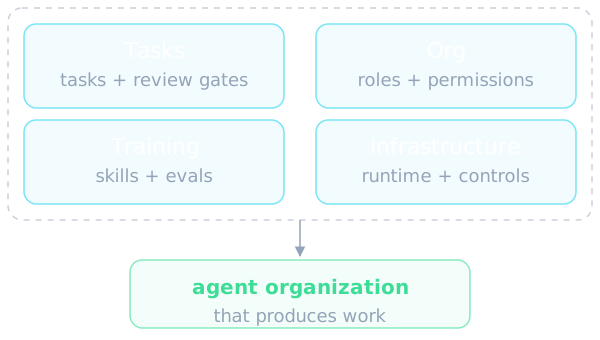
The README argues that four things have to work for an organization of AI agents to actually produce: the tasks, the org, the training and the infrastructure. The first pillar is an agentic task manager covering tasks, approvals and review gates, proactive agent coworkers, auditable routines and workflows, and verification from diffs, screenshots and tests. The second is an org chart for agents, with roles, permissions, boundaries, scoped secrets and responsible-user identities.
The third pillar is agent employee training: Skill Studio and shared org-wide skills, evals and saved test runs, active learning loops, quality metrics, performance reviews for agents, skill version history with restore, and reusable team templates. The fourth is the Agentic OS, the infrastructure that makes the work run: a cross-provider runtime, sandboxing, integrations and MCP servers, SSO, GRC, RBAC, cost controls, data privacy, run history and opt-in tracing.
Main features
The feature list in the README is long. Bring Your Own Agent means any agent that can receive a heartbeat counts as hired. Heartbeats are how agents wake for assigned work, follow-up messages or configured schedules. Goal Alignment links tasks and projects to organization goals so agents see the reason behind their work. Cost Control sets budgets per company, agent and project, tracks reported spend, sends threshold alerts and pauses work at configured limits.
There is also Multi-Organization, so one deployment holds several separated organizations; Task Threads, which keep conversations, plans, blockers, files and run history attached to the work; Governance with review and approval stages; and an Org Chart with hierarchies, roles and reporting lines. Apps and Connections let you connect GitHub, Notion, Railway or your own MCP server and set gateway actions to Allowed, Ask first or Off. Further items are Skills and Skill Studio, Scheduled Routines triggered by schedule, API or webhook, Artifacts and Feedback for viewing files agents produce, and ready-made teams for quick installs. The README marks Agent Chat and the chat or email connectors, such as Slack, Discord, Telegram and AgentMail, as experimental.
What sits under the hood
The README stresses that Paperclip is a full control plane, not a thin wrapper. For tasks, it has atomic checkout with a single assignee and execution locks so runs do not compete for the same item, plus blocker dependencies, comments, documents, attachments and inbox state. Heartbeat execution uses a database-backed wakeup queue with coalescing, budget checks, workspace resolution, secret injection and skill loading before invoking the adapter. Runs produce logs, usage records and adapter-specific session state, and bounded recovery handles supported failures.
On the infrastructure side the README names project workspaces with optional isolated git worktrees, runtime services such as dev servers and preview URLs, sandbox providers that extend execution beyond the local host, an out-of-process plugin system, encrypted secret storage, local or S3-compatible file storage, a durable activity log for auditing, and organization export and import. It warns that packages should be reviewed before sharing because plain environment values and local paths can remain, while referenced secret values are omitted.
Governance, budgets and control
Governance is the difference the authors emphasize. There are board approval workflows, execution policies with review and approval stages, decision tracking, budget hard-stops, and the ability to pause, resume or terminate agents. Configuration changes are revisioned so a bad change can be rolled back safely. Human access, agent eligibility and gateway action permissions are separate controls, and a call can be approved once or saved as a revocable rule.
For cost, Paperclip tracks tokens and spend by company, agent, project, goal, issue, provider and model, with budget policies that have warning thresholds and hard stops. The README admits that enforcement uses recorded spend, so usage reporting and in-flight work can delay a stop. That is an important detail for anyone planning to treat budgets as an absolute guardrail.
Installing and trying it
Paperclip is open source and self-hosted, with no Paperclip account required. According to the README, source development needs Node.js 24.11 or newer and pnpm 9.15 or newer; local Claude and Codex subscription sign-in also needs Python 3 and the corresponding provider CLI on the host, and the Docker image includes them. You can run a guided onboarding command from npm, or simply ask your own agent to read the installation guide and install it. The default quickstart runs in trusted local loopback mode, and an authenticated mode can be chosen instead.
When run locally, a single Node.js process manages an embedded PostgreSQL database and local file storage with no extra setup. For real deployments the README suggests pointing to your own PostgreSQL and deploying however you like, with remote access through authenticated mode on a private network such as Tailscale, or through Docker. A test-drive command quickly creates a trial instance already initialized with a CEO agent; it stays in the foreground, installs no service and creates no first task.
Where it sits in the agent ecosystem
The README draws clear boundaries. Paperclip is not just a chatbot, because conversations stay attached to tasks, plans and outputs. It is not an agent framework: the authors say they do not tell you how to build agents, they tell you how to run a company made of them. It is not just a workflow builder, not a prompt manager, not limited to one agent and not only for code review. The runtimes it names include OpenClaw, Claude Code, Codex, Cursor, Gemini CLI, OpenCode, Pi, Hermes, Grok Build and Kimi Code, plus custom processes, HTTP endpoints and external adapters.
For the same reason, filing the repo under the framework category is only an approximation of this page's category list. For agent builders, Paperclip is an operations layer on top: it coordinates and governs existing agents, while how each agent reasons or uses tools stays up to the agent. In its roadmap the README marks many items as done, such as the plugin system, skills, routines, approvals, the MCP tool gateway and agent evals, lists memory and knowledge as in progress, and shows items like MAXIMIZER mode, work queues and self-organization as not yet started.
Limits and when to use it
The README lists fitting situations: you want to build autonomous AI organizations, coordinate many different agents toward a common goal, have 20 simultaneous Claude Code terminals open and lose track, want agents running autonomously 24/7 while still auditing and chiming in, want to monitor costs and enforce budgets, or want to manage things from your phone. For a single agent doing simple work in one repository, much of this is likely overkill, although the README says you can start with one agent and grow into a team.
The README also answers a question many readers will have: why not simply point an agent at Asana or Trello? Its answer is that agent orchestration has subtleties, such as who has work checked out, how to maintain sessions, how to monitor costs and how to establish governance, and Paperclip handles them for you. It also clarifies that agents do not run continuously by default: they wake for assigned work and follow-up messages, optional timer heartbeats let them check for work periodically, and a mention alone does not assign work or wake another agent.
A few cautions apply. Agent Chat and the chat connectors are experimental. Bringing your own ticket system, such as Asana, Linear or Jira, is still on the roadmap. Anonymous telemetry is enabled by default; the README says no personal information, issue content, prompts, file paths or secrets are collected, and it can be disabled with an environment variable, the DO_NOT_TRACK convention, a config setting, or automatically in CI. On maturity, the authors say they have merged over 2,700 pull requests, but the README offers no performance benchmarks to check against.
Written automatically by AI from the repo's README and GitHub API data, with automated checks but no human review of every sentence. Report mistakes by email.