03 / AI REPO RADAR
Panniantong/Agent-Reach
100,696 starsLicense: MITLast push: On the radar:
A capability layer that gives AI agents internet access: one CLI that picks, installs and health-checks the tools for reading the web, YouTube, GitHub, Twitter/X, Reddit, Bilibili and RSS.
What Agent Reach is and the problem it addresses
Agent Reach is an open-source project under the MIT license, maintained by Panniantong, built around one promise: give an AI agent access to the internet with a single instruction handed to the agent. When this edition was collected the repository had 100696 stars on GitHub and its latest push was on 20 October 2026. The topics attached to the repo include agent-infrastructure, web-scraper, youtube-transcript, mcp and cli, which suggests supporting infrastructure for agents rather than a finished agent.
The problem the README describes is concrete. Agents can already write code, edit documents and manage projects, but when asked to go and find something online they often fail. The README lists a series of situations: no way to get subtitles from a YouTube video, no way to search Twitter because the API is paid, a block when reading Reddit from a server IP, pages that require a login such as Xiaohongshu, Bilibili's anti-bot controls, no good search tool, and raw HTML tags instead of readable text when fetching a web page.
Design idea: a capability layer, not another tool
The design section of the README states plainly that Agent Reach is a capability layer, not yet another tool. It sits above any specific implementation and is responsible for four things: selecting an approach, installing it, checking its health and routing. The actual reading is not wrapped by Agent Reach. The agent calls the upstream tools directly, so there is no extra wrapper layer in between.
The author's reasoning is that every time you set up a new agent you spend time finding tools, installing dependencies and tuning configuration: what reads Twitter, how to log in to Reddit, what replaces the Xiaohongshu CLI when it stops being updated. The README says that in March 2026 a batch of single-platform CLIs stopped being maintained and the project changed its routing so that users did not have to deal with it themselves.
How it works: ordered primary and fallback backends
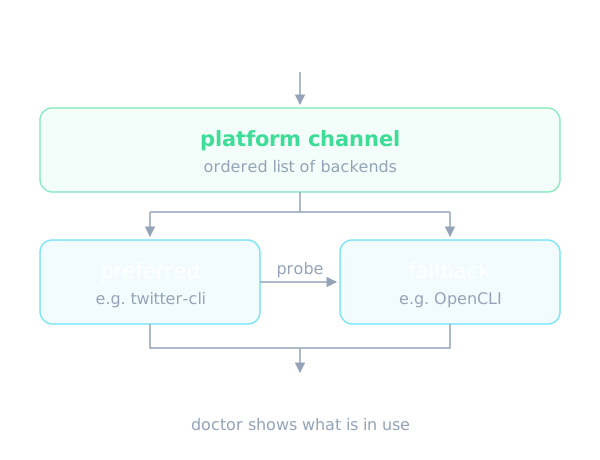
The core mechanism is that each platform is represented as an ordered list of a preferred backend and fallback backends. Changing the approach means reordering the list, not rewriting code. According to the README, each channel file probes the candidate backends in order for real, not just checking whether a command exists. The first backend that is fully usable is chosen, and a broken one comes with a repair prescription.
The agent-reach doctor command is the window into this mechanism: it reports which channels work, which do not, how to fix them, and which backend is currently in use for each platform. The README gives a dated example. In June 2026, yt-dlp was blocked by Bilibili's anti-bot controls with an HTTP 412 response, so the project switched to bili-cli and, by the author's account, users had to do nothing. This is the author's own claim, and the README offers no independent figures to check it against.
The current selection table shows how the pieces fit together: web pages are read with Jina Reader, Twitter with twitter-cli and OpenCLI as the fallback, YouTube with yt-dlp, Bilibili with bili-cli, whole-web search with Exa through mcporter, GitHub with the gh CLI, RSS with feedparser, and LinkedIn with mcp-server-linkedin and Jina Reader as the fallback. The author notes these are current choices, reviewed periodically based on real-machine testing.
Supported platforms and how much setup they need
The README splits platforms into those that work right after installation and those that need configuration to unlock more. The zero-configuration group covers reading any web page, extracting subtitles and searching videos on YouTube, reading RSS or Atom feeds, V2EX with hot posts and post details, and Bilibili at the level of search and video details through bili-cli without logging in. Whole-web search through Exa is configured automatically over MCP, and the README says it is free and needs no API key.
The group that needs extra configuration includes GitHub, Twitter or X, Reddit, Facebook, Instagram, Xiaohongshu, LinkedIn, Boss Zhipin, Xueqiu and the Xiaoyuzhou podcast. For GitHub, reading public repositories and searching work immediately, while private repositories, filing issues or pull requests and forking require a login. For Reddit the README is explicit that there is no zero-configuration path because the anonymous interface has been blocked; you need OpenCLI with a desktop browser session, or rdt-cli with a cookie.
One notable detail is how configuration is done. The README says you do not need to look anything up: tell the agent to help you set up a specific platform and it will guide you step by step because it knows what is required.
Installation and trying it out
Installation is described as copying one instruction sentence from the README and handing it to an agent such as Claude Code, OpenClaw or Cursor, after which the agent does everything else. The README also says the agent-reach install command by default only checks the environment and does not install system packages or write configuration. Only when the user explicitly allows it with the system option does the tool install dependencies and register a SKILL.md file in the agent's skills directory.
The README lists the steps the tool performs: install the agent-reach command line from this repository, check infrastructure such as Node.js, the gh CLI and mcporter, install and configure to the level that was authorized, detect whether the environment is a local computer or a server, and then ask the user whether more channels are wanted. By default only 6 zero-configuration channels are activated. A dry-run option previews every action without changing anything. The README also warns against installing the same-named package from PyPI, because that is not this project.
For OpenClaw users the README sets a precondition: command execution must be enabled, because Agent Reach relies on the agent running shell commands. A default tool profile geared toward messaging prevents the agent from running commands, so you must switch to the coding tool profile and restart the gateway. Other agents such as Claude Code, Cursor and Windsurf are not affected by this restriction, according to the README.
Using it in an AI agent workflow
The usage model the README describes is simple: once installed, the user does not need to remember commands. The agent reads the SKILL.md file and knows which tool to call. The examples in the README include asking to look at a link, where the agent uses curl; asking what a GitHub repository does, where it uses gh repo view; asking what a YouTube video covers, where it uses yt-dlp to pull subtitles; searching Bilibili with bili search; searching the whole web with Exa; and following an RSS feed with feedparser.
For people building agents the value is in separating web access from the agent's own logic. Instead of writing a reader for each platform and patching it whenever a platform changes its anti-bot rules, a developer gets a single checkpoint, the doctor command, to see what the agent can really read. The README adds that the tool works with any agent that can run a command line, including Claude Code, OpenClaw, Cursor and Windsurf.
In realistic situations such as asking an agent to gather feedback about a product, read a discussion about a bug on Reddit or summarize a technical video, platforms that need a login still require the configuration step first. The README does not describe how the quality of returned results is evaluated or how conflicts are handled when several backends return different data.
Security, privacy and account risk
The README has a dedicated safety section. Cookies and tokens are stored only locally, in a configuration file inside the user's agent-reach directory, with file permission 600 so that only the owner can read and write it, and according to the author they are not uploaded or shared. The code is open source and can be inspected, and the architecture lets you replace an individual channel file if you do not trust one component, without affecting the others.
The README is also frank about the risks. For platforms that use cookies, such as Twitter or Xiaohongshu, calling them through scripts or an API carries a risk of being detected by the platform and having the account restricted, so the author recommends a dedicated secondary account instead of your main one. The second reason is that a cookie is equivalent to full login access, so a secondary account limits the damage if the credentials leak.
Several cookie details are spelled out. Twitter accepts only content that the user exports manually with Cookie-Editor. Agent Reach does not perform the Xiaohongshu login on the user's behalf and does not read that platform's browser cookies. OpenCLI uses only a Chrome session that the user already has and controls. The uninstall step removes the configuration directory that holds all tokens and cookies, the agents' skill files and the MCP configuration in mcporter.
Limits and things to keep in mind
A few points deserve consideration. First, by the README's own account, many platforms have no zero-configuration path: Reddit, Facebook, Instagram and Xiaohongshu all need a logged-in session, usually through OpenCLI on a desktop, so not everything works right after one command. Second, the README says the author tracks platform changes and fixes things when they are blocked, but that is a maintenance commitment, not a guarantee of results at any given moment.
Third, the README leans toward promotion. It has a sponsor section introducing data-collection services and model platforms, a business-cooperation section with the author, and community links. These sections are not features of the tool and readers should separate them when evaluating it. The claim that everything is free, with the only possible cost being a server proxy of about $1 per month, is the author's statement, and the README says a local computer needs no proxy.
Finally, the README does not cover performance figures, accuracy of results, rate limits or each platform's terms of service. Collecting data from third-party platforms may breach their terms, and reviewing that is the user's responsibility.
When to use it and when not to
Agent Reach fits when you are building an agent that needs to read information from many different platforms and you do not want to maintain each reader yourself. It is especially suited to cases that need YouTube subtitles, Bilibili content, RSS, web pages cleaned through Jina Reader or semantic search through Exa, because the README describes those channels as usable immediately or configured automatically. The fallback backend design is also useful if you worry about platforms changing their policies frequently.
It is less suitable if you need official data under a service contract, because the tool relies on many community tools and browser login sessions. It is also not a replacement for a controlled large-scale crawling system; the README positions itself as a selection and health-check layer, while the reading is performed by the upstream tools. If your environment does not let an agent run shell commands, the README indicates the tool will not work.
The practical advice is to start with the default check mode or a dry run, run doctor to see which channels are healthy, open only the platforms you really need, and use a secondary account for platforms that require cookies. Finally, read the original README and the source code yourself before giving an agent permission to run commands on your machine.
Written automatically by AI from the repo's README and GitHub API data, with automated checks but no human review of every sentence. Report mistakes by email.