03 / AI REPO RADAR
NVIDIA/SkillSpector
23,548 starsLicense: Apache-2.0Last push: On the radar:
Security scanner for AI agent skills: finds prompt injection, data exfiltration and supply-chain risks before install, with an MCP server mode.
What SkillSpector is and why it is needed
SkillSpector is a security scanner for AI agent skills, released as open source by NVIDIA. The README describes it as a tool to detect vulnerabilities, malicious patterns and security risks before you install a skill into your agent. The question it wants to answer is plain: is this skill safe to install.
The reason the README gives is that agent skills, used in Claude Code, Codex CLI, Gemini CLI and other agents, execute with implicit trust and minimal vetting. According to the README, in the 31,132-skill analyzed subset of the research dataset, 26.1% of skills contain vulnerabilities and 5.2% show likely malicious intent. These are figures published by the authors from their own research dataset, and the README text we have does not describe the measurement method.
SkillSpector is also part of the NVIDIA Verified Skills pipeline, where skills are scanned, evaluated and signed before publication. Skills that pass are published to the NVIDIA skills catalog. From the metadata, the repository has 23548 stars, an Apache-2.0 license and its latest push on 2026-10-30.
How it works: two-stage analysis
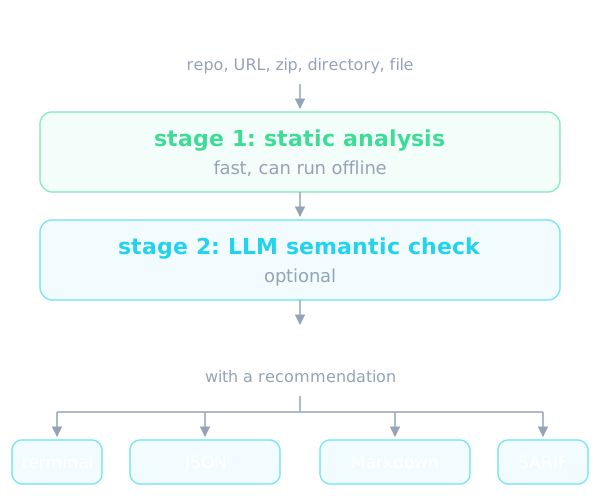
The README describes two stages of analysis. The first is a fast static analysis and the second is a semantic evaluation by a language model, which is optional. The split makes sense: static analysis is cheap and can run offline, while the LLM layer helps understand the intent of natural language text, which is where prompt injection tends to hide.
The tool accepts varied inputs: Git repositories, URLs, zip files, directories or a single file. Results can be written to the terminal, JSON, Markdown or SARIF, which suits both human reading and CI pipelines. Each scan yields a risk score from 0 to 100 with a severity label and a clear recommendation.
One notable detail is live vulnerability lookup: pattern SC4 queries OSV.dev for real-time CVE data and falls back to offline mode automatically when it cannot reach it. There is also a baseline mechanism for accepting known findings, so that later scans surface only new issues.
71 vulnerability patterns across 17 categories
The core of the README is a catalog of 71 vulnerability patterns across 17 categories. The categories are prompt injection, data exfiltration, privilege escalation, supply chain, excessive agency, output handling, system prompt leakage, memory poisoning, tool misuse, rogue agent, anti-refusal, trigger abuse, dangerous code by AST, taint tracking, YARA signatures, MCP least privilege and MCP tool poisoning.
Each pattern has an identifier, a severity and a description. For example the prompt injection group covers instruction override, hidden instructions in comments or invisible text, commands that exfiltrate context, and large whitespace padding that hides instructions. The anti-refusal group catches phrases that tell an agent never to refuse or to drop warnings, and jailbreak framing that nullifies guardrails.
The data exfiltration group covers sending data to external URLs, harvesting environment variables to collect secrets, scanning directories for sensitive files and transmitting conversation context externally. The privilege group covers requesting access beyond the stated functionality, invoking sudo or root, and reading SSH keys, tokens and passwords.
Supply chain and agent autonomy
The supply chain group has more than ten patterns. The README lists unpinned dependencies, fetching external scripts in the curl piped to bash style, code obfuscated with base64 or hex, dependencies with known CVEs, abandoned dependencies, typosquatting, shipped Python bytecode, executables hidden inside document containers, and redirection of package manager sources.
The excessive agency group looks at unrestricted tool access, high-impact decisions made without a human in the loop, scope creep beyond the stated purpose, and resource access without rate limits or quotas. The README text we have is cut off in the middle of this group, so we cannot describe the remaining groups in full.
The strength of this layout is that it touches both sides: code in a skill, such as runnable scripts, and text in a skill, such as instructions addressed to the model. For skills the boundary between those two is blurry, and a Markdown file can be as much an attack vector as a Python file.
Installation and usage
The README tells you to create and activate a virtual environment first, because the Makefile targets assume it is active. You can use uv or pip, and the Makefile uses uv if available. There is a quick CLI-only install and an install from source. To run the MCP mode you install the MCP extra at install time. The exact commands live in the original README, so this article does not copy them.
The README also warns that the project will download and install additional third-party open source software, and that you should review their licenses before use. For a security tool this is worth noticing.
If you would rather avoid installing Python, you can build a Docker image locally from the included Dockerfile, which is based on the Docker Official Python 3.12-slim-bookworm image. You mount the current directory into the container's scan directory to scan a local folder, pass credentials through an env file for LLM scans, and write reports to the mounted directory.
There is also a recursive scan mode: the recursive option scans each immediate subdirectory containing a SKILL.md as an independent skill, with a default aggregate limit of 32 skills. You can change the limit with max-skills, but 0 does not mean unlimited, and other discovery, byte and time budgets still apply. The README also provides a contrib folder with a batch scanner that runs in parallel.
Resource bounds and fail-closed behavior
The README stresses a fail-closed design. For remote and archive inputs there are two independent caps: a per-ingest cap of 100 MiB, applied to URL downloads, the total uncompressed size of zip archives and the disk usage of Git clones; and a cap of 10,000 entries in a single zip. Breaching either causes a closed failure instead of a silent skip, as protection against zip bombs.
Separately, individual files are analyzed up to 1 MB, a downstream limit of its own. When a recursive scan hits the skill count limit, the aggregate report still names the omitted skills and coverage is treated as incomplete. The fail-on-incomplete option lets CI fail when coverage is incomplete, while the default exit policy is unchanged.
An interesting case is explicit scan scope: you can repeat the exclude option to omit some files before analysis. Excluded files remain in the coverage denominator as entirely uninspected, and the report may not issue a safe recommendation when exclusions apply. This is a cautious design that keeps a partial scan from being mistaken for a clean one.
LLM analysis and model providers
For best results the README advises configuring an OpenAI-compatible LLM endpoint for semantic analysis. The provider is chosen through the SKILLSPECTOR_PROVIDER variable. The README table lists openai, anthropic, anthropic_proxy, bedrock, nv_build, gemini, ollama, azure_openai, openai_compatible and providers that run through local CLIs such as claude_cli, gemini_cli and opencode_cli. The codex_cli provider alone is disabled because its read-only sandbox permits host file reads.
SkillSpector also works with local OpenAI-compatible servers such as Ollama, vLLM and llama.cpp, and with managed inference gateways. The README spends many lines on how structured output is handled across providers, because some models reject a forced tool call. This is an operational detail rather than a concept, and it matters only when you configure an endpoint yourself.
One candid note in the README: the default configuration targets DeepSeek as the cheapest public option, and the README says DeepSeek-Chat is expected to sunset, and that the contributor has no hardware to test local models. The README invites a more universal backend. In other words, the quality of the LLM layer depends heavily on the model you choose, and the README does not measure that quality.
Running as an MCP server to gate installs
SkillSpector can run as a Model Context Protocol server so local agents such as Claude Code, Codex CLI and Gemini CLI can call scanning as a tool and gate skill or MCP installs on the result. The README describes this as turning SkillSpector into a runtime guardrail instead of an out-of-band audit step.
The server exposes a single tool, scan_skill. It takes a Git URL, file URL, zip, Markdown file or directory and returns a structured verdict with a risk score from 0 to 100, severity, recommendation, a safe-to-install flag and findings. The result also reports whether an LLM was used, so a low score from a static-only scan is never mistaken for a clean full scan.
On security, the README warns that the HTTP transport ships without authentication and only allows binding to loopback addresses. For remote access you must put an authenticating reverse proxy in front. Local paths and file URLs are rejected over HTTP so unauthenticated callers cannot read arbitrary files, and only credential-free remote Git or zip URLs are accepted. The README also notes that an initialize hang reported for the stdio transport still applies.
Limits and things to watch
Although it focuses on security, SkillSpector is not an absolute guarantee. The score is an estimate based on patterns and an LLM, so it can miss things or raise false alarms. The README provides a baseline mechanism precisely because false positives exist. Any partial scan, for example with exclusions or when a limit is reached, must not be treated as fully safe.
The LLM layer sends skill content to the model provider you choose, so consider whether data leaves your machine. The README also says to treat a configuration variable that contains gateway keys as a secret. This concerns operating the tool itself safely.
Finally, because the README text that reached us is truncated, later pattern groups, detailed CI guidance and all concrete commands are absent from this article. Read the original README for those parts instead of relying on this summary.
When to use it and when not to
SkillSpector is a particularly good fit if you often install third-party skills or MCP servers, if your team maintains an internal skills repository, or if you want a checkpoint before skills are published. Using it as a CI step with SARIF output or as an MCP server that gates installs are both scenarios the README targets.
It matters less if you only use skills you wrote yourself and accept no outside code. It also does not replace reading a suspicious skill yourself and applying least privilege to your agents. With 23548 stars and an Apache-2.0 license, it is a light layer of defense worth trying before you let an agent run code you have not read.
Written automatically by AI from the repo's README and GitHub API data, with automated checks but no human review of every sentence. Report mistakes by email.