03 / AI REPO RADAR
morluto/rea
373,627 stars+68,203 / 7dLicense: MITLast push: On the radar:
An MCP server with a CLI that lets agents reverse engineer software: native binaries, Electron/JavaScript, .NET, APKs and websites, returning findings with evidence and limitations.
What REA is and who it is for
REA, short for Reverse Engineer Anything, is an MCP server with a command line interface for reverse engineering software. The README describes it as one MCP for reverse engineering across binaries, applications and runtime behavior. Its central promise is that when you see a feature you like, you can understand how it works, down to the binary level.
The scenario in the README is concrete: you see a feature in an app and want it in your own product. You ask your agent to investigate it with REA. The agent can inspect the app without its source code, explain how the feature works, show the evidence, and build a version for your project.
REA connects your agent to tools for inspecting native binaries, JavaScript and Electron apps, .NET assemblies and websites. You can use the same tools from your terminal. The README states that analysis runs locally and that results include the evidence and limitations behind each conclusion. That is the author's description; what matters for users is that the tool is designed to present uncertainty alongside findings.
How it works
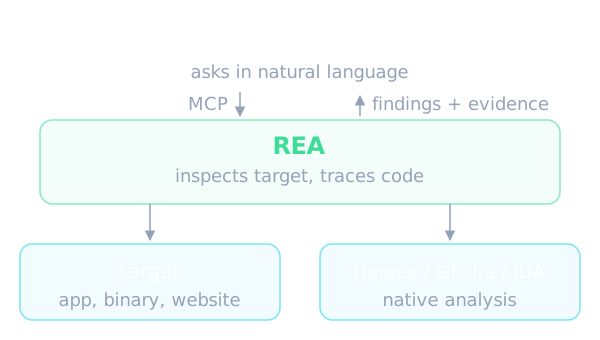
The README summarizes the mechanism briefly. Your agent calls REA through MCP to inspect the target and trace relevant code. REA returns findings with their evidence. The agent uses them to ask follow-up questions, explain the behavior, or write and test an implementation. CLI commands use the same workflows.
Setup registers REA with your agent and installs matching workflow instructions. For native binary analysis REA can use an existing Hopper, Ghidra or IDA installation, and setup can optionally install Hopper with your approval. Static JavaScript analysis needs no native analysis engine. This suggests REA acts as an orchestration layer while deep decompilation relies on specialized tools that already exist.
The README also covers MCP input schemas: by default REA uses compact schemas to reduce context overhead. When you need the complete field guidance and nested validation details, you set the REA_MCP_INPUT_SCHEMA_PROFILE variable to full in your MCP registration. Both profiles keep the full tool set and the canonical server validation.
What REA can analyze
The target table in the README is wide. For native binaries REA returns pseudocode, assembly, strings, symbols, calls and references, relying on Hopper, Ghidra or IDA. For JavaScript and Electron it returns modules, imports, source maps, routes, IPC and native add-on relationships. For websites it returns page structure, scripts, network observations and requested screenshots, and needs a Chrome-family browser. For .NET assemblies it returns metadata, CIL instructions, declared native dependencies and build comparisons, entirely statically.
The list goes further. There are Android APKs with manifest declarations, classes, decompiled methods and references, requiring headless JADX and a full JDK. There are APK signatures, Android devices through adb, Android resources through Apktool, Flutter apps, firmware through Binwalk or Unblob, recorded packets through TShark, and recorded logic signals through sigrok-cli. There are also less common formats such as Unity IL2CPP metadata, Godot PCK archives, Erlang BEAM bytecode, EVM bytecode, WASM, SQLite databases, PyInstaller executables, GGUF and safetensors model metadata, CUDA and HIP GPU code objects, and Go and Rust binaries.
Each target has its own requirements, which the README records in a requirements column. Many entries are purely static analysis that never runs the application. The README says static JavaScript and .NET inspection read the supplied files without running the application. Runtime capture, by contrast, runs or interacts with the selected target using your user permissions, and each runtime guide describes its effects. That is a safety distinction worth understanding before you let an agent execute an unfamiliar program.
Installing and trying it
According to the README, REA needs Node.js in version 22, 24 or 26 with specific minimum releases, plus npm. You run the setup command through npx with the package name rea-agents, choose your agents, review the proposed changes and approve them. This adds REA's MCP server and matching workflow instructions, with backups of existing configuration, and then you restart your agent. The README lists Claude Code, Codex, Cursor, Gemini CLI, Grok Build and other agents among those supported.
The README includes a warning worth reading: get REA from the morluto/rea repository, the official website or the rea-agents npm package, and follow installation and release links from those official sources. A similar repository name or a copied README does not establish that a download is official. For a tool that analyzes and can run targets on your machine, that reminder deserves to be taken seriously.
On Linux the README adds a prerequisite: Ghidra, JADX, firmware tool launches and static JavaScript or Electron analysis require a procps-compatible ps on REA's PATH for process ownership checks. Recovery steps are in the installation documentation.
After registration you ask the agent in natural language, replacing the example with your target app and the feature you want to understand. From the terminal the README shows inspecting an extracted JavaScript or Electron app directory or an ASAR, with results that include modules, imports, Electron boundaries and evidence. For native analysis from the CLI you configure a provider first; the exact commands live in the CLI and Evidence guide, which is not part of the source text this article relies on.
Updating and maintenance
The README stresses that REA changes quickly and new releases include frequent bug fixes, so you should keep your installation up to date. For a CLI installed with npm globally or bun globally, there is an update command, and the rea --update flag is an alias for this verified workflow that accepts the same global output flags.
A few technical details are given: updater commands retain at most 4 MiB of stdout and stderr combined, oversized metadata replies are rejected after the command exits, and human progress output respects terminal backpressure. Global updates with Bun need Bun 1.2.17 or later; with an older release you must upgrade Bun manually first.
After updating you run the setup command the update prints, to refresh your agent registrations and skill. If you use npx, you update the agent setup with the latest package. When you hit a bug the README advises updating first, since a recent release may already fix it; if the problem persists, open an issue with your REA version, target type, steps to reproduce and error output.
The README's worked examples
The README gives three case studies. The first is the game DX-Ball: follow a sound call into its position-to-pan helper, inspect the instructions, and turn incomplete pseudocode into C. The README says the reconstruction passes 3,205 original-x86 cases and reproduces all 63 compiled function bytes. These are figures published by the author.
The second is Notion: find the renderer's clipboard API, follow it through preload and IPC into the main process, and inspect the rich clipboard format. The third is TH04, an old PC-98 game: inspect the original 16-bit instructions, recover the fixed and aimed angle calculations, and compare the reconstructed C++ with the historical compiler output.
These examples show the usage the README wants to emphasize: results that can be checked against the original. The README does not, however, give overall statistics on success rates across many targets, so the three cases should be read as selected examples rather than a general reliability measure. The README also invites users to share their own cases through an issue or a pull request.
Using it in an AI agent workflow
In an agent workflow REA plays the role of a source of facts. Instead of letting the model guess how an app works, the agent calls a tool, receives modules, calls, strings or network observations together with evidence, and only then reasons about it. The README adds that the agent uses the findings to write and test an implementation, so the loop of investigate, rebuild and compare fits inside a single working session.
The README answers several common questions. Any agent that supports local MCP servers can use REA; setup configures the supported agents and other clients register the MCP server manually. Deep native analysis needs one of Hopper, Ghidra or IDA, while static JavaScript and .NET inspection do not. On data, the README says REA analyzes targets locally, but your agent receives the tool results, and its model provider has its own data policy.
The README also says REA returns pseudocode and assembly for native analysis and recovers modules and their relationships for JavaScript or Electron. In other words the output is raw material for the agent to rebuild from, not the original source code intact. The accompanying documents, including the MCP contracts and the tool catalog, tell you exactly what each tool returns.
Limits and responsible use
Wide coverage comes with many conditions. Each target type needs its own external tool and is sometimes verified on only one operating system. For example offline ELF analysis needs caller-supplied pwntools on Linux x64, WASM needs caller-supplied WABT, and packets need TShark on Linux. The practical expectation is that you will prepare your environment per target type; not every feature works straight after the setup command.
The README has clear disclaimer and licensing sections. REA is for lawful research, education, interoperability, software preservation, and analysis of software you own or are authorized to examine. REA-authored code is under the MIT license, while third-party material keeps its own licenses. For commercial tools such as IDA Pro, Hopper and JEB, the README says you must legally obtain them and be authorized to use them; REA grants no tool license, key or activation entitlement, and trials remain subject to vendor terms.
Because the ability to analyze an app without source can be misused, users must judge the legal side and the terms of the target software themselves before asking an agent to produce a reproduction. The README gives no performance information for very large binaries beyond suggesting that you raise the Ghidra or Hopper startup deadline through environment variables, so with large targets you will need to experiment.
When to use it and when not to
REA fits when you genuinely need to understand the behavior of software without source code that you are permitted to analyze: compatibility research, recovering an algorithm from an old game, seeing how an Electron app wires the clipboard or IPC, or inspecting the contents of a package. Having evidence and limitations attached helps keep the agent from concluding too much.
It fits less well if you only need to read existing open source code, if your environment cannot install external tools such as Ghidra or Hopper, or if the target is bound by a license that forbids reverse engineering. You should also think about sending analysis results to a remote model, since the README notes that the model provider has its own data policy.
On the metadata figures: the repository has 373,627 stars, with 68,203 gained over the last 7 days, under the MIT license. The README itself also celebrates a milestone of 300,000 stars and thanks the community. That figure is stated by the author in the README, and we repeat it for reference only, not as evidence of quality. Try the tool on a small target you are allowed to analyze before building it into a regular workflow.
Written automatically by AI from the repo's README and GitHub API data, with automated checks but no human review of every sentence. Report mistakes by email.