03 / AI REPO RADAR
microsoft/TokenEconomizer
4,499 starsLicense: Apache-2.0Last push: On the radar:
A Microsoft plugin that learns from earlier agent sessions in a repository to cut cost: it remembers repo facts, stops loading unused tools and redirects turns that get stuck.
What TokenEconomizer is and the problem it targets
TokenEconomizer is an open source plugin from Microsoft for coding agents. The README title describes it as experience-driven, black-box cost control for coding agents. In short, the plugin learns from sessions an agent has already run in a repository and uses that experience to cut waste in later sessions, without changing the agent, its model or its weights. At the time of this snapshot the repository has 4,499 stars, uses the Apache-2.0 license and was created recently, so this is a very young project.
The author list in the README includes researchers from UC Berkeley, Microsoft Research and Microsoft Security, and the README points to a paper and a project page. The repository is therefore both a usable tool and the code that accompanies a research study. This article relies only on the README and the repository metadata; where the README is silent, for example on the internal implementation of each mechanism or on results in your own repositories, the article says the README does not cover it.
Why coding agent costs repeat themselves
The README frames the problem plainly: coding agents are built to finish tasks, not to keep them cheap. Every turn pays again for the agent instructions, for every loaded tool, and for the conversation so far. When a developer uses the same agent on the same repository again and again, much of that cost repeats: the same facts are rediscovered, the same unused tools are sent, and the same kinds of failing loops come back.
From this the plugin takes its approach: learn across the sessions of a repository instead of treating each one on its own. What the plugin spends on learning is expected to be paid back over the sessions that follow. The README lists four guiding principles, and they show a fairly careful design mindset: work through what the agent already reads, count cost as it is billed, protect task success, and keep every action reversible.
The cost principle deserves attention. The README says most tokens in a session are cached re-reads, so cost is computed with cache pricing and includes the plugin own model calls. That means the savings the plugin reports already subtract what the plugin itself spends, which makes the figure less one-sided than a simple before and after comparison.
The three mechanisms: micro-skills, tool pruning and the loop guard
The plugin has three mechanisms, and each can be switched on or off separately. The first is micro-skills, which remembers how the repository works. The second is tool pruning, which stops loading tools that go unused. The third is failure-loop intervention, called the loop guard, which steps in when a turn is stuck. Each targets a different source of waste, so they can be seen as complementary layers rather than overlapping ones.
What they share is that the plugin works through channels the agent already supports: facts enter the context at session start, and tools are removed through the agent own settings. The README stresses that nothing depends on the agent learning a new tool. The plugin also announces each of its actions in one line, and if any part of it fails, your session carries on as if the plugin were not installed.
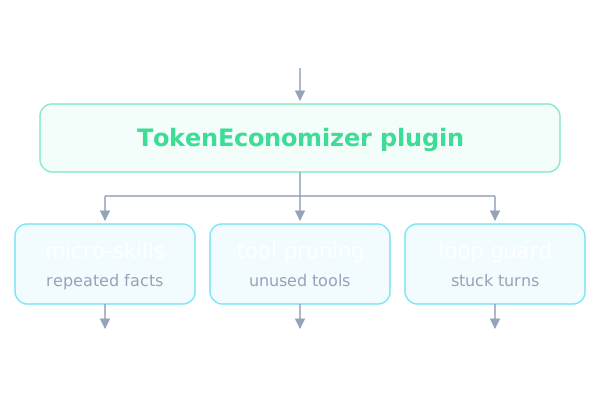
Micro-skills: remembering facts about the repository
The README explains that sessions keep rediscovering the same things: a build step that must run first, the spelling of a command that works in this repository, such as calling pytest through python -m where pytest is missing or using npx for tsc where tsc is not on the path, an environment variable a command needs, or where generated files live. Micro-skills learns such facts, in any language, from two sources: failures that repeat across sessions, and a model that reviews the recent sessions every k sessions, with k set to 3 by default, and proposes facts.
A fact is stated at the start of each session only once three sessions have confirmed it, and it is dropped when later sessions contradict it. This rule reflects the principle of protecting task success: facts form only from repeated evidence. The mechanism is off by default, because its proposer adds model calls and the savings depend on the repository and on the work you do there.
The README also describes a useful mode besides on and off. With microskills set to envfacts, the plugin learns facts only from repeated failures and makes no model calls. That is a sensible way to try the mechanism without extra model cost. The README does not cover the exact storage format of the facts beyond saying that what is learned stays on your machine.
Tool pruning: stop sending tools that go unused
The definition of every loaded tool is sent with every request. A tool that goes unused over p prompts spread across at least m sessions, or over s sessions of any length, is left out of the next sessions through the agent own settings. The defaults are p equal to 10, m equal to 2 and s equal to 5. One command brings a tool back, and a tool you give back is not removed again.
The README explains why it counts prompts: long sessions weigh more, yet at least m sessions are required so that a single session never decides alone. The plugin writes the deny list only after your sessions in the repository have been idle for q minutes, 60 by default, or at the latest a day after the list formed. The stated reason is that a conversation resumed after its tools change must write its whole history to the prompt cache again instead of reading it, and after an idle hour the cache has expired anyway.
What can be left out differs by agent. On Claude Code the plugin leaves out single tools and writes to a local Claude settings file. On Codex it leaves out capability packages and writes to the Codex config file. On the Copilot CLI it leaves out whole MCP servers. Pi loads only four tools, so there is nothing to remove, and Cursor Agent and opencode are not supported for this part yet. The plugin adds only its own entries, never touches deny rules you wrote, and keeps a settings file it creates out of git.
There is a propose mode: the plugin only proposes the deny list, and nothing changes until you run the apply command. If the plugin cannot edit a file safely, for example a Codex config that your repository commits, a settings file that is not valid JSON, or a symlink that leads out of the repository, the list stays a proposal and the session start says why.
The loop guard: stepping in when a turn is stuck
When a turn, meaning the agent work on one prompt, keeps hitting the same failures, a judge model checks whether it is really stuck. If the judge is at least c sure, 0.7 by default, the agent gets a redirect: a short note added to its context to try another approach. The number of redirects per turn is at most r, 1 by default. If the turn is still stuck after that, the plugin tells you how to stop it, and it never stops a turn itself.
The loop guard does not act from the start. It first learns how long a turn in this repository usually runs, and waits until e turns, 5 by default, have ended well with no failing check after the last edit. After that, a turn showing signs of looping, such as the same failures repeating or errors piling up, goes to the judge. One case is redirected without the judge: a turn that runs past b times the usual length, 2.5 by default, while churning the same edits through the same failures.
The README is also candid about visibility limits. In Claude Code the plugin line shows only in the detailed transcript, so the plugin asks Claude to repeat it in its reply, and the model may word it differently or leave it out. In a headless run nobody may be watching, so a flagged turn runs until it ends or reaches the agent own limits. Afterwards the status command counts the redirects and the still stuck notices.
Results as reported by the authors
Every number in this section is a claim by the authors, not a result verified by a third party. According to the README, the paper ran five agent and model combinations on the same 277 SWE-Bench tasks from six repositories. Each task ran as its own session, each repository tasks ran in order, and everything started with nothing learned. Costs include every model call TokenEconomizer made.
The authors report 18.4–30.9% lower mean cost across the five combinations, cheaper in all 30 repository and combination cells, and Pass@1 up in 4 of 5. Within each repository and combination, cost fell by 5–40%. The savings are also said to hold on Web-Bench, at 16–21% lower, and on two security-auditing benchmarks where every task is in a new repository, at 6–20% lower.
The project page has interactive charts, per-repository numbers and nine annotated runs, and the experiments folder reruns the SWE-Bench and Web-Bench experiments. The README gives no results for a user own repositories, so your real savings may differ. It is worth noting that the experiments started from nothing learned, which means the cost of learning is already inside the reported figures.
Installing and trying it
The requirements are one of the supported agents, signed in any way it supports, plus Python 3.10 or newer on the path. The README says the plugin needs no API key of its own and never handles credentials, so any plan or login works. The plugin supports Claude Code, Codex, the GitHub Copilot CLI and Pi, with experimental support for opencode and Cursor Agent. Cursor support is macOS and Linux only.
The install steps differ by agent but share one idea: clone the repository into a folder you plan to keep, because Claude Code, Codex, the Copilot CLI and opencode run the plugin from that clone. Then start the agent in one of your repositories, trust the folder, and run the status command. On Codex the hooks need review and take effect from the next session. On Claude Code and the Copilot CLI you also run the catalog refresh command once per machine, and again after the agent updates. The exact commands are in the README, so this article does not copy them.
The README gives a table of supported versions per agent, for example Claude Code from 2.1.300 to 2.1.310, and says older versions are not supported; the commands were tested on the oldest and newest version in each range, and newer versions have not been tested. Codex before 0.141.0 does not run plugin hooks at all. Day to day you work as usual; the status, microskills, toolprune and config commands are only for viewing or changing behavior. Inside an agent a command costs one model turn, while from a terminal it is free.
Using it in an AI agent workflow
The clearest value is for people who use a coding agent daily on a fixed set of repositories. By default tool pruning and the loop guard are on and micro-skills is off, and the README says that with these defaults the plugin calls a model only when a turn shows signs of looping. The extra cost is therefore low by design. You can begin by only reading the status command to see what the plugin learned and what your sessions cost, and decide later what to switch on.
A careful approach is to set tool pruning to propose so you review the deny list yourself, and to try micro-skills in envfacts mode so that no model calls are added. For a quick switch off, setting the environment variable TE_DISABLE to 1 when you start the agent turns the whole plugin off for that session, and TE_LOOPGUARD set to off turns off one mechanism. Everything the plugin learns stays on your machine, in a plugin folder under your home directory.
For teams that load many MCP servers, tool pruning is especially relevant because on the Copilot CLI it can leave out whole MCP servers that go unused. The loop guard suits cases where you let an agent run unattended and want a light safeguard against fruitless fix loops. The README does not cover integration with external cost tracking systems, so reconciling against your invoices remains your own job.
Limits and things to watch
This is a young project and the README marks several parts as experimental. Support for opencode and Cursor Agent is experimental; for Cursor the README says hook delivery from a live Agent session has not yet been verified, session cost is reported as unavailable, and neither agent has tool pruning yet. The supported agent versions sit in narrow ranges, so when an agent updates beyond them you must weigh the risk yourself.
On behavior, the loop guard never stops a turn on its own, so in headless runs it records the problem but cannot save the cost on the spot. On Codex, Esc interrupts the turn but a command it started keeps running until you use the stop command. The savings from micro-skills depend on the repository. The benchmark results are the authors own published claims on SWE-Bench and Web-Bench, and they are no guarantee for your workflow.
The README does not cover several points enterprise users may care about, such as a detailed security review of the hooks, the effect when several people share a repository, or how sensitive data is handled in learned sessions. What the README does say is that what the plugin learns stays on your machine. You should read the design notes in the docs folder of the repository yourself before using it on an important codebase.
When to use it and when not to
It is worth trying if you regularly use one of the supported agents on the same few repositories, token cost is a real worry, and you like tools that keep every action reversible. The restore command that gives tools back, facts being dropped when contradicted, and the promise that the plugin never stops a turn itself all keep the risk of experimenting low. It also suits people who want to reproduce the numbers, thanks to the experiments folder.
It is less suitable if your agent is outside the list or on a version beyond the tested range, if you mostly work in many new repositories rather than a few familiar ones, or if your organization needs security assurances the README does not provide. For brand new repositories the authors report smaller reductions on the two security-auditing benchmarks than in the returning-repository setting, though these remain their own published figures.
In summary, TokenEconomizer is a systematic and fairly careful approach to agent cost: learn from history, intervene through channels the agent already offers, and always leave the final decision to the user. Its real value has to be verified on your own repositories, and the safest way to begin is the status command together with propose mode.
Written automatically by AI from the repo's README and GitHub API data, with automated checks but no human review of every sentence. Report mistakes by email.