03 / AI REPO RADAR
lexmount/moli
19,251 starsLicense: Apache-2.0Last push: On the radar:
A headless browser written in Rust, aimed at AI agents: fetch and extract pages, search the web and automate tasks via CLI, CDP or WebDriver.
What Moli is and the problem it addresses
Moli is a headless browser written in Rust, described by its author as production-ready and built specifically for AI agents. The key idea in the README is an on-demand layout and rendering design: the project wants to combine a complete browser runtime with a lightweight resource footprint. At the time of this edition the repository shows 19251 stars; the edition metadata lists Apache-2.0, while the README lets you choose Apache-2.0 or MIT.
The problem the README targets will sound familiar to anyone building agents: most browser automation tasks really need the structure of a page, not a continuously rendered visual world. A conventional browser keeps layout and paint state alive even when the agent only wants some text or to run a snippet of JavaScript. Moli tries to drop that unnecessary work while keeping the capabilities of a real browser.
According to the README, Moli helps an agent fetch and extract web pages, search the web and automate browser tasks. You can use it through the command line, through CDP, through WebDriver Classic or through WebDriver BiDi. The project supports Linux, macOS and Windows, so you are not tied to a single operating system when you place it in your pipeline.
How it works: layout and paint on demand
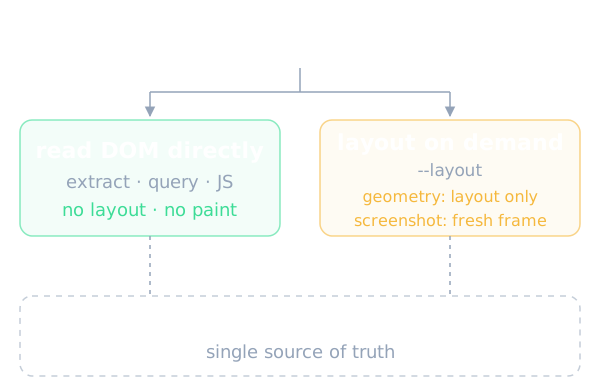
The core idea is to treat the native DOM and style state as the single source of truth. When an agent asks to extract HTML or Markdown, query the DOM, run JavaScript, or inspect network and storage, Moli reads the browser runtime state directly and does not trigger layout or paint. The README presents this as a table that maps each kind of agent request to what Moli actually does.
When the agent needs an element's box, a hit-test at some coordinates or coordinate-based input, Moli runs one layout calculation and retains only the latest frozen layout tree. For a screenshot it rebuilds from the current DOM and style, replaces the frozen tree, renders a fresh frame and discards the paint state after use. For a screencast, each poll compares only generation metadata: if nothing changed no frame is emitted, and if something changed exactly one fresh frame is rebuilt and emitted.
On architecture, the README stresses that Moli is a standalone browser kernel rather than a wrapper around Chromium. It relies on libcurl for network transport, html5ever for HTML parsing, rusty_v8 for JavaScript, Servo and Stylo for selectors, cascade and computed style, Taffy together with Parley for box and text layout, and AnyRender, Vello CPU, usvg and the Rust image ecosystem for software rendering. The README is explicit that the system has no incrementally maintained layout tree, damage graph, retained display list, GPU compositor or persistent window.
Main features
The README lists a fairly complete web runtime: streaming HTML parsing, a native DOM, JavaScript on V8, modules, timers, microtasks and events, iframes and workers, the CSS cascade, Fetch, XHR and WebSocket, cookies, WebCrypto, and profile-scoped storage including localStorage, IndexedDB and OPFS. In other words, pages that depend heavily on JavaScript can still run before their content is extracted.
For output, the CLI directly produces HTML, Markdown, JSON, semantic text trees and frame-aware serialization, along with waits on selectors, scripts or responses and network tracing. The README also mentions a compact, model-friendly semantic tree, a sensible choice if you want to put page content into an LLM context without spending many tokens on redundant markup.
Another notable point is the unified automation binary: CDP, WebDriver Classic and WebDriver BiDi share one kernel and one scheduler, and are served from the same endpoint. Per the README, no separate ChromeDriver, geckodriver or additional browser installation is needed. When real visual capability is required, adding the layout flag enables complete box construction, Taffy layout, Parley text layout, layout-backed hit-testing and input, viewport screenshots and low-frequency CPU-rendered screencast frames. There are also operational options such as profiles, cookies, HTTP cache, proxies, resource families, connection limits, timeouts, a private-network policy, user-agent overrides and diagnostic logging.
Installing and trying it
The README has a quick start section with two routes. The first is to give your AI agent a prompt and let the agent handle installation. The second is direct installation, with one method for Linux or macOS and a separate one run in PowerShell on Windows. The copy of the README used as the source for this article does not preserve the actual command text, so this article does not repeat them; open the original README to get the exact commands.
For the command line, the README describes three groups of work. The first is page extraction: by default it renders Markdown with Moli's default completion strategy, or it can return the compact semantic tree directly. For visual output you enable on-demand layout and write a viewport PNG, a full-document PNG or a paginated PDF. The second group is exporting a page after an explicit interaction by combining the eval or eval-file flag with the dump flag.
The README gives specific behavior for eval combined with dump: the expression runs after the page is ready, promises are awaited, any pending navigation is followed before export, the return value is discarded without serialization, and an exception fails the command without emitting a dump. Only the expression you supply performs interactions. For the full option list, covering output formats, page-load and response waits, profiles, proxy settings, resource policies and tracing, the README suggests running the fetch command with the help flag. The third group is starting the automation server, which serves all three protocols on one endpoint, and Playwright can connect directly over CDP.
Using it in an AI agent workflow
The README names the scenarios where Moli's cost model fits best: crawling, browser-use agents, retrieval pipelines, evaluation environments and reinforcement-learning workloads. What they share is many short sessions, where per-session cost and memory decide how many tasks can run in parallel. A browser that does not have to keep a visual state alive has an advantage in exactly these places.
In a real agent you can picture two layers. A light layer uses the fetch command to get Markdown or a semantic tree of the page and feeds it into the model context. An interactive layer runs the automation server and lets the agent, or a framework such as Playwright, drive it over CDP. The README also mentions a WebMCP playground with a CLI to list and call any site's native WebMCP tools, plus booking, restaurant and pizza demos, which are handy for trying how an agent calls tools exposed by a page.
The README also describes the relationship with Lexmount: Moli is Lexmount's open-source headless browser, while Lexmount Browser is the managed cloud runtime and control plane built around it. The README states that the open-source browser is fully usable without Lexmount Browser, so you can run it yourself without depending on a commercial service.
Benchmarks published by the author
All figures below are the author's own claims from the README and have not been independently verified. In the mixed public-web crawl test over 192 public URLs from major Chinese and international sites, a page counts as successful only if it produces meaningful content after JavaScript runs. Moli reached 103 useful pages, a 53.6% success rate, a median time of 1.43 s and a median RSS of 73 MiB. Chrome Headless reached 101 pages, 52.6%, 1.43 s and 773 MiB. Lightpanda reached 85 pages at 44.3%, and Obscura reached 57 pages at 29.7%.
For a sample agent workload, the README reports CDP ready in 34.85 ms for Moli against 169.37 ms for Chromium, an active episode p50 of 33.40 ms against 57.13 ms, and a peak PSS of 102.46 MiB against 348.82 MiB. On WPT, in the selection used to validate the agent-browser scope, one full run passed 1.612 million tests.
On Lexbench-Headless-Browser, the full corpus has 1,928 tasks covering raw CDP, 13 pinned automation tools including Playwright, Puppeteer and Selenium, and web-platform semantics. To include Kitesurf, which exists only as a remote endpoint, the chart uses 1,308 comparable tasks. Moli 0.1.1 passed 1,071 tasks, a success rate of 81.88%, against Kitesurf at 62.08%, Lightpanda at 53.29%, Obscura at 44.88% and Chrome at 99.85%. The README notes that Kitesurf ran at k=1, uncovered tasks count as not passed, and the reproduction conditions of a remote service differ from those of local binaries. In the shared 557-task run, Moli's median CPU time per task was 100.6 ms and its median peak memory was 92 MiB, while Chrome recorded 687 ms and 697 MiB.
Limits and things to watch
The README draws its own scope fairly clearly. Within the agent-browser scenarios defined in the project documentation, Moli is ready for production use and remains under active development. The intentional boundaries are: no GUI browser, persistent window, GPU compositor or retained multi-frame paint architecture; no pursuit of pixel-for-pixel parity with Chrome; and no high-fidelity Canvas, WebGL or media playback.
On capture and printing, the layout flag supports software screenshots and native PDF through CDP or the CLI with embedded fonts, but not every Chrome screenshot or print mode is implemented. In return, the README commits that unsupported protocol paths return explicit errors, and that Moli never pretends a browser action, event, network observation or visual result occurred. That is a valuable property for agents, since a clear error is easier to handle than a fake result.
Expensive operations must be enabled explicitly. By default the layout policy mocks deterministic geometry in a compatible format with no real layout or paint. The layout flag enables on-demand layout, the resource flag fetches all optional visual and media resource families, and there are separate flags for images, fonts, audio, video, media and text tracks. Persistence such as the profile directory, HTTP cache directory or cookie file is also enabled only when the workload needs it. Finally, the 53.6% success rate in the crawl test shows that nearly half of the pages still did not yield useful content, so try your own target sites before trusting the general figure.
When to use it and when not to
Moli fits if your workload leans toward fetching content, querying the DOM, running JavaScript and inspecting the network at scale, where memory and startup latency matter. Teams already using Playwright can try swapping the browser behind them for Moli, since the README says Playwright can connect directly over CDP. If you want to self-host without a cloud service, the README states that the open-source browser is fully usable.
Conversely, think carefully if you need exact visual parity with Chrome, need Canvas, WebGL or high-fidelity media playback, or need every Chrome screenshot and print mode. For pages behind login walls, challenge pages or shell-only applications, the README counts them as unsuccessful in its own crawl test, so do not assume they will work well.
In short, Moli is worth watching for agent builders who need a light browser. Read the project scope carefully, rerun the benchmarks on your own set of pages, and remember that every figure above is the author's claim. The README does not address topics such as security when running untrusted page code or a version roadmap, so those need your own checking.
Written automatically by AI from the repo's README and GitHub API data, with automated checks but no human review of every sentence. Report mistakes by email.