03 / AI REPO RADAR
google/artemis
12,449 starsLicense: Apache-2.0Last push: On the radar:
Google tool that turns natural-language instructions into actions on real Android phones, with an MCP server, CLI and Python SDK so coding agents can test apps themselves.
What ARTEMIS is and the problem it solves
ARTEMIS is an open-source project from Google that turns natural-language instructions into automated actions on Android phones. The README sums up its goal in one line: let AI assistants and test suites use real phones like a human. The GitHub description adds that it runs end-to-end workflows, captures logs, and integrates with AI coding assistants such as Antigravity, Codex and Claude Code.
The problem it targets is the gap between coding agents and real devices. A coding agent can change app code, but finding out whether the new build behaves correctly on a phone usually needs a person tapping through it. ARTEMIS gives the agent a pair of hands: it reads the screen, decides on an action, performs it, and returns screenshots and logs so the agent can check the outcome.
According to the GitHub metadata collected for this edition, the repository has 12449 stars and is licensed under Apache-2.0. Its topics are ai-agents, android, google, test-automation and testing. The README also states that code not owned by Google lives under the third_party directory, with one directory per upstream project, each carrying its own license and metadata; one such part comes from the mobile-use project by Minitap, released under Apache License 2.0.
The README also links to a workflow showcase, a quick start, a section on MCP for IDEs, benchmark results and a Discord community. The project is available in English and Chinese.
Key highlights according to the README
The first highlight is cross-app automation: running testing workflows and everyday tasks on Android from natural-language instructions. The demonstration in the README sets up driving routes in Google Maps, calculates the total durations, then opens YouTube to play a Coldplay song.
The second is multimodal targeting. ARTEMIS uses element indices when they exist, and falls back to coordinates and visual locating for custom interfaces. The architecture section is more specific: it combines accessibility hierarchies and OCR with visual models for Canvas, Compose and Flutter interfaces.
The third is IDE diagnostics. The Model Context Protocol integration lets Antigravity, Claude Code and Windsurf drive test devices while collecting Logcat output and screenshots. The fourth and fifth are the Flash and Pro execution profiles, described in detail below. The last is the result on the AndroidWorld benchmark, where the authors state they reached 99%+ task completion; that is a figure the authors publish about themselves.
How it works: from request to diagnostic report
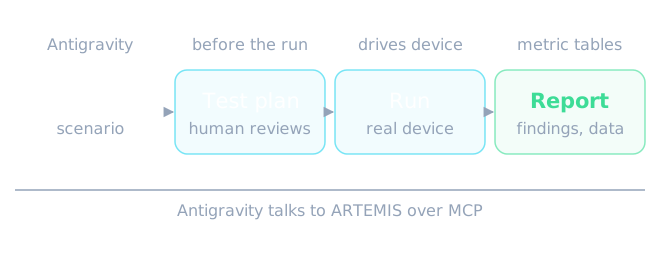
The README describes an autonomous testing workflow between Antigravity and ARTEMIS over MCP in four steps. Step one is prompt input: you describe the test scenario and target metrics in Antigravity. Step two is test plan generation: the tool drafts a step-by-step test plan and architecture for you to review. Step three is autonomous execution: it drives a real device, navigates the interface and profiles performance. Step four is the final report: structured audit findings, metric tables and raw datasets.
Two things stand out. The plan is put in front of a human before the run, and the output is a structured report rather than a one-line success or failure message. For anyone building agents, that is the kind of interface between agent and tool you want: natural-language input and output that can be checked.
Installation and first run
The first requirement is an Android device with USB Debugging enabled, or a connected emulator. The project's one-click startup script then detects and installs system tools such as ADB, scrcpy, FFmpeg and Python dependencies through uv. There is a version for macOS and Linux and another for Windows PowerShell. The README notes that PowerShell does not search the current directory for executable scripts by default, so the call needs the explicit current-directory prefix, whereas Command Prompt uses the bare file name.
The script also offers to install a global MCP configuration and the Artemis Mobile Testing Mindset rules into supported IDEs: Antigravity, Cursor, Claude Code, Codex, Windsurf, VS Code, Cline or Roo, and OpenClaw. If you prefer, you can configure MCP interactively on first setup with the artemis init command, and install the artemis command machine-wide with uv tool install. Once running, a web interface opens in your browser with a device connection wizard, live screen mirroring, a prompt sandbox and execution replays.
To run directly from the command line, the README gives an example of the artemis run command asking it to open Settings, find Battery and report the current level, with the flash profile selected.
Connecting to agents through MCP and behavioral rules
ARTEMIS ships with a native Model Context Protocol server, so any MCP client can plug a real phone into a conversation. Configuration can be generated with the artemis mcp command and its generate-config option, which prints a suitable TOML or JSON snippet for Codex, Antigravity or Claude Desktop. You replace the repository path and point the command at the Python interpreter of your own virtual environment.
Just as valuable is the set of behavioral rules for agents, in the rules.md file of the mcp_server directory. The README calls it a mobile testing mindset, meant to make the coding assistant act like a senior mobile test engineer and never invent interface interactions. It covers active exploration before coding, the strategy for routing between Flash and Pro, latency and timing compensation, and a locator pattern that prefers dynamic locators and falls back to coordinates.
How you mount the rules depends on the tool. For Antigravity, add the content to Workspace Rules, Global Rules or agent instructions. For Claude Code, the artemis mcp command with the install claude option places the rules in the user's rules directory; the README says to install to exactly one location, because Claude Code loads both CLAUDE.md and the files in rules, so duplicating them wastes context. For Cursor, use cursorrules or a dedicated rule file. For Codex, add to AGENTS.md. For Windsurf and OpenClaw, add to workspace rules or global system prompts.
Once connected, you can type a long request into the IDE chat. The README's example asks the assistant to build the latest changes into an APK, install it on the connected device, open the login screen with a test account, check whether any unexpected popups appear after login, and return screenshots of the final page.
Four usage modes
The README lists four ways to use the tool. The first is the web visual test console, started with the artemis ui command, offering real-time screen projection, an interactive panel, natural-language test dispatch, live reasoning telemetry, action trajectories and replay; from any terminal you can restart, stop or check the server.
The second is the MCP server, which connects Antigravity, Claude Code, Windsurf and other MCP clients to real devices for bug reproduction and test execution. The third is the developer CLI, running directly from the terminal for automated test cases, exploratory stability inspection or the AndroidWorld benchmark, with structured output. The fourth is the Python SDK, used as a standard library inside test frameworks such as pytest or in CI/CD, with Pydantic-typed structured output and assertion support.
The Python SDK is described as a client with zero runtime dependencies installed on the development machine; ADB, the agents, the models and image processing stay on the device host. That split helps when you want the phone attached to one machine and driven from another.
Two profiles: Flash and Pro
Flash is the fast, token-efficient profile. It is a reactive loop at typically 3–5s per step: one model observes the live screen, thinks and acts, with no graph orchestration. The README says it suits routine, deterministic interface tasks. The loop is unbounded by default because history is compressed rather than capped: older screenshots are folded into visual summaries and older steps are chunked into eras that can be recalled on demand, and Flash can query the session recording through a video analysis tool. Transient interface elements such as auto-fading control bars or toasts are handled by chaining taps into one click sequence.
Flash's limitations, in the README's own words, are no task plan or notes, no pre-execution safety net, no checkpoint verification or final report, and no ADB shell.
Pro is a planning and verification workflow at roughly 15–40s per step, built as a multi-agent graph. A Planner maintains a living Markdown task plan with milestones and check items. The Operator executes it with the full toolset, including Explorer grounding, notes, history recall, video analysis and ADB diagnostics. The Explorer tier is a per-profile user setting that the agent never chooses.
Every action in Pro passes a pre-execution Safety Net, XML first with a pixel fallback, while multi-action fast bursts fire back to back to beat turn latency on transient interface elements. A blocked or failed action opens an execution incident that stays in the Operator's context until a later action succeeds, so recovery is handled by the Operator itself with no separate repair agent. A read-only Checker verifies plan checkpoints and runs a final review against the original goal, with verification levels off, final (the default), checkpoints and strict. Pro handles long-horizon workflows of 100+ steps, continuous monitoring and an optional written report.
Architecture and what gets installed on the phone
The architecture section makes three points. One is pre-execution checks and action bursts: Pro checks the target against the live interface tree and pixels before dispatching each action. Two is element locating, combining accessibility hierarchies, OCR and visual models for custom-drawn interfaces. Three is shared history compression between Flash and Pro: older screenshots are replaced by visual summaries and completed steps are compressed into searchable history chunks, with context thresholds deciding when raw turns are replaced.
The README has a separate section on what ARTEMIS installs on your phone, and users should read it. The first task on a device installs the Artemis Accessibility Helper, a small accessibility service that reads the screen layout without taking the UiAutomation connection. You will see a collapsed notification saying the test helper is running and a new entry in the Accessibility settings. The README states that the service listens only on the phone itself and sends nothing elsewhere; that is the authors' claim.
You can pre-install it to avoid a delay of about 3 s on the first task, inspect it with the helper status or doctor commands, remove it at any time with helper uninstall, switch to UIAutomator2 through an environment variable, or disable automatic installation. If the helper fails mid-task, ARTEMIS falls back to UIAutomator2 and says so in the task timeline, in the task management status and in the final report.
The AndroidWorld benchmark: reading the number correctly
The README states that ARTEMIS reached a 99%+ completion rate on AndroidWorld, Google Research's benchmark spanning 20+ apps and 100+ multi-step tasks, and labels the result SOTA. The repository description repeats the 99%+ success rate. This is a figure the authors publish about their own work; there is no independent source in this article to verify it, and it has not been recomputed here.
When using the number to make a decision, remember that a benchmark measures a fixed set of tasks, while your app has its own interface and flows. The README does not state the model configuration, token cost or run-to-run variance behind that result. The best approach remains to try a few important flows of your own app.
Using ARTEMIS in an AI agent workflow
The clearest case is a mobile development loop with an agent taking part: the agent edits code, builds an APK, installs it on a device, opens the right screen, checks for anomalies and sends screenshots back. Thanks to MCP, the whole loop happens in the same conversation with the IDE. A second case is bug reproduction: you describe the failing steps in natural language and let the tool replay them on a real device, collecting Logcat output along the way.
A third case is plugging into an existing test pipeline through the Python SDK in pytest or CI/CD. There, typed output and assertions let the agent's result become an ordinary automated check. These are scenarios inferred from the modes the README describes, not workflows published by the authors.
Limits and roadmap
The README currently targets Android only: iOS support appears on the roadmap as work not yet done. Other roadmap items are a plugin for Android Studio for in-editor debugging and test recording, lightweight on-device vision models for low-latency, privacy-first automation, and real-time duplex voice interaction.
On the operational side, note that Flash has no pre-execution safety net, so for tasks with consequences such as payments or deleting data, Pro is the better fit. The README also gives no detail on keeping real accounts safe while an agent operates, or on limiting the agent's permissions on the phone; use a test device or test accounts. Finally, because the tool installs an accessibility service, consider your organisation's policy before using it on shared devices.
Conclusion: when to use it and when not to
ARTEMIS is worth trying if you build Android apps and want a coding agent to verify its own changes on a real device, or if you want to create interface tests in natural language instead of writing element-locator scripts. It also suits teams that want one standard MCP interface to a phone that several different agents can share.
It is a poor fit if your product is mainly on iOS, if you need an independent guarantee of reliability, or if your organisation's policy forbids installing an accessibility service on test devices. A sensible way to start is with an emulator, running the flash profile on one simple task, then moving to pro for the flows that matter.
Written automatically by AI from the repo's README and GitHub API data, with automated checks but no human review of every sentence. Report mistakes by email.